Showing posts with label raspberry pi. Show all posts

Thursday, October 24, 2024

My mom bought a Xiaomi Robot Vacuum E5 #xiaomi #robotvacuum #robotvacuumcleaner


(All links will open up in a new tab.)

Hey guys,

Check it out!

My mom had always wanted to buy a robot vacuum. She finally did after seeing one on a deal. She told me to set it up and see how it works. She got a Xiaomi Robot Vacuum E5. I like the design. Simplicity at its best. I had a problem with the iPhone app version though.

Luckily, I also have a Samsung Zflip 5 Android phone. I downloaded and quickly connected the robot vacuum to my phone. You need to download the Xiaomi Home app and follow the app instructions. It will ask you to choose the vacuum version and press both the arrow and the power button to link.

It was relatively quick and easy. It is also easy to maintain. At first, I thought, you had to unscrew to open the dust collector. You just need to press open the bin button and clear it all. I know it works because there was so much dust in it. 

For the price, I'm really impressed with the robot vacuum. It is surprisingly strong too. It literally pushed everything that could be moved. The chairs, doors, flower pots, portable aircon and even felled my bicycle inside my room.


You need to be sure nothing will get stuck to the robot broom rotator. Even if it did, a notice is sent to the phone. The app needs to be updated. Use the app to schedule the dates and times. You can also manually control it. Cool!

The robot vacuum reminds me of my Raspberry Pi car robot. You can build your own and even code it to run manually or automatically using Python code. This robot vacuum doesn't have a camera so you won't know where it's going. Will be good if it has.


I wish the robot could map the house and show its location in the phone app. You can hear the motor running but it's not as loud as a normal vacuum cleaner. It will work as long as the battery lasts and returns to its docking charger. If you want to, you can instruct it to dock.

The battery would last over five hours. I live in a small apartment building and it takes a long time to vacuum every section of the house. That doesn't include the time it got stuck. I'm not in a hurry for it to finish. It does a pretty good job.

I've had it for a few days now and I like it. It does the job. Sometimes, you need to sweep away that little rubbish it pushed from under the tables, chairs, or cabinet. I just remembered the part where you can pour water into the mop holder.   

I also added a floor detergent. If your house is too dusty, you can run it to vacuum the floor first before adding the mop part. Since the robot had cleaned the whole house, I let it vacuum and mop. Now, I feel satisfied that the robot helps maintain the house floor. 

In the future, who knows I'll be able to get a robot to clean the whole house!

What do you guys think?

Help support this blog and YouTube channel. Buy me Coffee @


*Shop the latest deals on Amazon via our links to support us. Tq! :)

Subscribe to our blog and YouTube channel for the latest posts and video uploads!

Happy cleaning!

#xioami #robotvacuum #vacuum #xiaomirobotvacuum #robotmop


Saturday, June 05, 2021

Nintendo Switch lite - SmileBASIC4 - Coding Console Calculator


Nintendo Switch Lite - Blue

Hey guys,

Check it out!

One of the things I like about my Nintendo Switch lite is that I'm not just using it for gaming. I like watching videos on Youtube and also listening to music. No Netflix? No Spotify? Well, you just need youtube. Once awhile, I'll post pics and short clips videos on Facebook or Twitter.

Another thing I like is the software SmileBASIC4 and FUZE4. Although, I mostly spend my time with SmileBASIC more. You can learn to code games and play them on your own Switch. What I really like about SmileBASIC is that it's not just for games. The language is pretty much similar to BASIC and Python.


Nintendo Switch Lite - Blue

I'm more into Python because of Raspberry pi. I had always wanted to learn to code but didn't get the chance when I was in school. I only saw that you can create your own smart car robot with Raspberry Pi and Arduino that I was interested in. That's where I started to learn to code with Python.

The kids nowadays got the chance to learn about programming with Microbit. I actually got it for myself too. Playing with them is really fun. And, of course, it's more fun learning to program with 'toys' like this. Where you can literally see things work.


Adeept BBC Micro:bit Sensor Starter Kit | Microbit Programmable Starter Kit for Micro:bit with 35 Projects PDF Tutorial Book | Micro:bit and Expansion Board Included

Anyway, I played with Microsoft Visual studio and followed a tutorial to create a console calculator with C++. There's also a tutorial for C#. Instead of following the tutorial, I was wondering if I could take some of the code and create a console calculator on my Switch lite with SmileBASIC4.

I thought the core of the code in C# which is the calculation is pretty simple enough to redo with SmileBASIC. This is the part where knowing Python actually helps me. The fact that SmileBASIC is similar(almost) to BASIC and Python makes it much easier.


Learn C++ Quickly: A Complete Beginner’s Guide to Learning C++, Even If You’re New to Programming (Crash Course With Hands-On Project)

I was actually stuck with the INPUT problem in SmileBASIC 4. In python, I could easily let a user input to choose an option and then Print whatever I want. It keeps coming out with all the answers for plus, minus, multiplication, and divide.

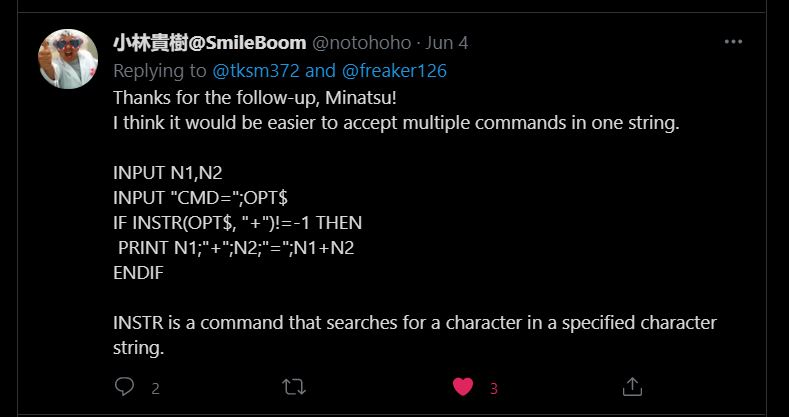
I thought to just let it be. I don't think there's any calculator in the world that gives out an answer all at once. Lol. In the end, I decided to ask @notohoho, the CEO of Smileboom on Twitter. He was kind enough to answer my question the last time. Thankfully, he was also keen to help me this time around too.


I was stuck trying to print the option of the user with the INPUT command.


Probably, one of the @notohoho students or SmileBASIC users gave me a solution of using the command OPTION aka opt$.


While @notohoho gave me this solution of using the command INSTR(OPT$,"").

I tried both of the solutions and it didn't work at first. It was only when I realized that I had put the endif at the wrong place. You can see the pics of my earlier code where I've placed all the endif at the bottom, instead of after every if. That's basically how I learn, from trial and error.


I decided to add an option "x" where the user can get all the calculation answers at once. Kinda cool!


The second part of the final code. Of course, you can copy these. Add anything you want to it. I was even thinking of adding background music. I can even upload it to the SmileBASIC server but I'm lazy. There are others that already upload better calculator apps.

You can watch the video and see how it works here


Nintendo Switch with Neon Blue and Neon Red Joy‑Con - HAC-001(-01)

If you had gone to visit the C# tutorial page, you'll see that the console calculator looks similar to the one I created using SmileBASIC 4. There's actually more to the C# tutorial and personally, the code is more 'cumbersome' to me. While with SmileBASIC4, it looks much simpler.

That's part of another reason why I like SmileBASIC. It's simplicity. I guess it's meant to be easy. For learning purposes. For a newbie like me? Also, with the Nintendo Switch, its portability meant, you can bring it and code anywhere. I actually code this calculator while in bed using the on-screen keyboard.

I'm self-learning coding just for fun and basic knowledge. Like I've said, I've been wanting to learn to code since I was a child. The kids nowadays are so fortunate that there are many programs suited for their age to learn. The good thing is that because of the Internet, it's much easier to research and learn online.

If you're interested, come join the fun!

What you guys think?

Help support this blog and youtube channel. Buy me Coffee @

https://www.buymeacoffee.com/W04oadL

*Shop the latest deals from Amazon via our links to support us. Tq!

Subscribe to our blog and youtube channel for the latest post and video upload!

Happy coding!


P.S. Nintendo Switch Lite - Blue


Tuesday, April 13, 2021

Controlling my STS-PI RASPBERRY PI ROBOT WITH POWKIDDY X18! #powkiddyx18 #raspberrypirobotcar


GPD XD Plus [Official distributor, Latest HW & Most Stable Update] Foldable Handheld Game Consoles 5" Touchscreen, Android 7.0 Fast Mediatek MT8176 Hexa-core 2.1GHz CPU, 4GB RAM/32GB ROM

(All links will open up in a new tab.)

Hey guys,

Check it out!

A couple of blog posts ago, I wanted to try if I could control my STS-Pi, a Raspberry Pi robot with the Powkiddy X18 integrated controller. I decided to dust off my R3 and make it happen. I have to research some of the things that I've forgotten.

My 16GB MicroSD cards with Recallbox and Raspbian OS wouldn't work. I haven't played with them for a while and I'm not sure why they won't work anymore. I had to re-format one of the cards that has a Kano OS.

GPD XD Plus [Official distributor, Latest HW & Most Stable Update] Foldable Handheld Game Consoles 5" Touchscreen, Android 7.0 Fast Mediatek MT8176 Hexa-core 2.1GHz CPU, 4GB RAM/32GB ROM

I love Kano OS. It's actually for kids to learn about computers and coding. I decided to re-download and install the old version of Raspbian-stretch because I need to use the Raspi-config to turn on my Raspberry Pi camera.

I'm using the same Raspberry Pi 3 that used to learn to make everything work. I didn't want the hassle of having to learn anything new now. If I can get the things that used to work and just try to use the Powkiddy X18 remap buttons, I'll then be able to control my sts-pi robot with the integrated controller.

Freenove 4WD Smart Car Kit for Raspberry Pi 4 B 3 B+ B A+, Face Tracking, Line Tracking, Light Tracing, Obstacle Avoidance, Colorful Light, Ultrasonic Camera Servo Wireless RC

I installed the Pimoroni software via the terminal. The web control didn't work when I tried to show it on my video, it suddenly stopped working. So, I just went straight to using SCRATCH. Using scratch to control my sts-pi motor is much easier.

Visit this site for more info on the STS-PI robot if you also have the Explorer Hat. For control using SCRATCH, go to this blog. Download the link for the scratch template and add the scratch code to the template. This way, you can control the motor and also take pictures at the same time. Pretty nifty.

PIM082 - Explorer HAT Pro for 40-Pin Raspberry Pi

Powkiddy X18 remap buttons work by just putting it to the scratch code. I also tried using the on-screen keyboard but, if you open the remap button, the keyboard will go away. I discovered that I can just use the remap button when I select the on-screen mouse available with the Raspbian OS. 

When you use the on-screen mouse, the arrow keys and several other useful keyboard keys are at the bottom of the screen. I tried putting the remap buttons on those keys and it finally works. So, now, I can control the motors with the integrated controller. Voila!


The Powkiddy X18 is really becoming my jack-of-all-trades device. I really like it. If I had known, it was not just for Android or retro gaming, I might have bought it much earlier. Maybe I wasn't ready for it.

When you're my age, you suddenly realize things seem to be happening for a reason and at the right time. I noticed it when my father died a couple of months before the virus was reported. He has diabetes and it would be pretty hard to see him during or if he dies during the pandemic.

I got fired from my job before the pandemic. No problem staying at home throughout the earlier days. I took the opportunity to blog and do YouTube videos. I want to thank those who bought stuff via my Amazon links as it helps.

I love tech and games!

What do you guys think?

Be among the first to help support this blog and YouTube channel. Buy me Coffee @

https://www.buymeacoffee.com/W04oadL

*Shop the latest deals from Amazon via our links to support us. Tq!

Subscribe to our blog and YouTube channel for the latest posts and video uploads!

Find something you love to do and you don't have to work for the rest of your life!

Happy portable computing!

#raspberrypi #powkiddyx18 #raspberrypirobot #python #coding #pimoroni #scratch

Thursday, April 08, 2021

USING WEBCAM TO RECORD VIDEOS AND TAKE PICTURES ON POWKIDDY X18!


GPD XD Plus [Official distributor, Latest HW & Most Stable Update] Foldable Handheld Game Consoles 5" Touchscreen, Android 7.0 Fast Mediatek MT8176 Hexa-core 2.1GHz CPU, 4GB RAM/32GB ROM

Hey guys,

Check it out!

Well, I finally got the USB Webcam to work on my Powkiddy X18. It's not without a problem though. It doesn't easily connect and I discovered that I need to open and close the app or go to the setting to change the permission. Either way, as long as it works.

I also found out later that the USB Webcam, an Android app that I like couldn't record with sound. After fed up with messing around with the settings, I tried other apps from the Google Play Store and found one that can. And, it's even free without any pesky ads.


GPD XD Plus [Official distributor, Latest HW & Most Stable Update] Foldable Handheld Game Consoles 5" Touchscreen, Android 7.0 Fast Mediatek MT8176 Hexa-core 2.1GHz CPU, 4GB RAM/32GB ROM

I thought that it might be because of the OTG cable at first, not being good enough. But, when I tried again, it works. I still have to open and close the app though. Kinda a hassle. But, like I said, as long as it finally works. Lol. You have to keep trying if it doesn't work the first time around.

My USB webcam is a pretty cheap one. Cost me only around $10 bucks after redeeming the voucher. If you intend to get a good picture or video, you might want to invest in the expensive and smaller one. I'm only interested in using it for video calls on my PC and testing on the Powkiddy X18.


Powkiddy X18 Handheld Games Console 2-Player Video Game Machine 5.5-Inch WiFi

I really like the Powkiddy X18. I didn't really look at it at first because I thought it's just another Android and Retro gaming console. It's when I realized that I can install Termux or Ubuntu (via the Andronix app) on it that I become interested. 

The clamshell form factor makes it looks like a mini laptop. Actually, it's almost the same exact copy of the New Nintendo 3DS XL. But, it doesn't have a camera, a second screen, and a stylus. The X18, Android OS flexibility is what I've always wanted on my old NN3DS XL. 


2K Super HD Best Webcam for Live Streaming Gaming Distance Meetings Video Record. USB Web Camera with Extra Gift of Earbuds Zoom/Skype/Facetime/Teams, PC Mac Laptop Desktop

I'm wondering if I can use a Bluetooth or wifi security camera to connect to my X18. That will be cool. I'm also thinking of linking it to my raspberry pi 3 car and using the controller to control it. Having the remap button app will be nifty to use.

I haven't played with my raspberry pi for a while now. It might be handy now to try and work with the Powkiddy X18. One thing, I haven't tried out is creating my own drone. Not having the parts is making it difficult for me to try it. But, would have been interesting to be able to control it with the X18.


Ruko F11Gim Drones with Camera for Adults, 2-Axis Gimbal 4K EIS Camera, 2 Batteries 56Mins Flight Time, Brushless Motor, 5GHz FPV Transmission, GPS Auto Return Home, 5times Zoom No Fisheye

The Powkiddy X18 and the GPD XD Plus is using Android O.S. hopefully, they'll build something as close as the current high-end mobile phone. With all the bells and whistles. The difference with the mobile phone is of course the integrated controller.

At the end of the day, you can always go back to playing Android or retro games on it. Having an integrated controller means you don't have to carry extra stuff around. One thing for sure, as much as I like being able to link an external controller or triggers, having something like the X18 is much better.

I find myself being lazy to add those accessories to play games on my mobile phone. That's why the X18 with its integrated controller is much better and less of a hassle. Now, I'm hoping for an upgraded version with a camera so I can easily do video calls, take some pictures or videos. All on my cheap X18!

What you guys think?

Help support this blog and youtube channel. Buy me Coffee @ 

https://www.buymeacoffee.com/W04oadL

*Shop the latest deals on Amazon via our links to support us. Tq! 

Subscribe to our blog and youtube channel for the latest post and video upload!

Happy portable Android gaming/computing!


P.S. GPD XD Plus [Official distributor, Latest HW & Most Stable Update] Foldable Handheld Game Consoles 5" Touchscreen, Android 7.0 Fast Mediatek MT8176 Hexa-core 2.1GHz CPU, 4GB RAM/32GB ROM


Monday, December 21, 2020

Super Nintendo World Direct 12.18.2020


Nintendo Switch with Neon Blue and Neon Red Joy‑Con - HAC-001(-01)

Hey guys,

Check it out!

I was a little lazy to watch the latest Super Nintendo World direct 12.18.2020. But, decided to watch it anyway. I'm glad I did. Mr, Shigeru Miyamoto of Nintendo did a quick tour and updates on Universal Studios Japan's new area, Super Nintendo World.

I must say, I love it. Hoping to be able to visit it one day. I've never been to Japan, it's already an interesting ancient place to visit. Everyone basically, knows japan for the legends of Samurai, it's swords, anime, games, music, and movies.


Nintendo Switch with Neon Blue and Neon Red Joy‑Con - HAC-001(-01)

Isn't it kind of ironic that Japan used to be involved in the world war with Germany to conquer the world? Just shows that peace is the only solution for a country's success. There's still war in the middle east and some parts of Africa.

All these idiots, vying for power and wealth. What's the use of all that if it's only temporary and your country in ruins? In the end, it's the people that suffer. Yes, people have differences in thinking, but war is never the solution.


Nintendo Switch - Animal Crossing: New Horizons Edition - Switch

Anyway, what I like about the Nintendo World is how colorful it is. It's just nice just to be able to visit the physical Mario and Luigi world. It's almost as if you're inside the game itself. I would really like to try the Mario Kart racing game.

The Super Nintendo World looks like such a happy place to be. You can walk around and interact with the surrounding. If you get a special watch, you can hit a block and get coins. You'll be able to walk through the famous pipe and eat at the toad, mushroom restaurants.


Nintendo Switch™ w/ Neon Blue & Neon Red Joy-Con™ + Mario Kart™ 8 Deluxe (Full Game Download) + 3 Month Nintendo Switch Online Individual Membership

The place will also have some of the music in the games played out. So, it'll really make the atmosphere familiar and fun. One thing I kept thinking while Mr. Miyamoto showed the place is how there'll be so many people, it'll be jam-packed.

The Super Nintendo World at Universal Studios Japan will open on February 4th, 2021. Well, I'm not sure if it will since the pandemic is still not totally controlled around the world. Hopefully, the vaccines will help. Once everyone had the vaccines, people will be free to move around again.


Mario Kart Live: Home Circuit -Mario Set - Nintendo Switch Mario Set Edition

Meanwhile, the only physical Mario Kart racing I'll be able to play is the new Mario Kart Live. Which is pretty interesting to play with while you're stuck at home in the pandemic. It'll be more fun if there's Mario Drone or Mario Robot.

If you're interested in learning, creating, or playing with your own mechanical robots, get a Raspberry pi robot. You'll learn how to code in Python programming which is great for amateurs or experts enthusiasts alike.

Last but not least is that Super Nintendo World will also be open in the United States and Singapore in Asia. So, if you can't go to Japan, you can visit states like Hollywood, California, Orlando, and Florida which Super Nintendo World will also open soon in the near future.

Well, what you guys think?

Buy me Coffee if you like our blog and youtube channel @

https://www.buymeacoffee.com/W04oadL

*Shop the latest deals from Amazon via our links to support us. Tq!

Subscribe to our blog and youtube channel for the latest post and video upload!

Stay happy and stay safe!

Peace no war!


P.S. Nintendo Switch™ w/ Neon Blue & Neon Red Joy-Con™ + Mario Kart™ 8 Deluxe (Full Game Download) + 3 Month Nintendo Switch Online Individual Membership


Saturday, October 17, 2020

Mario Kart Live vs Raspberry pi Smart Robot


Mario Kart Live: Home Circuit -Mario Set - Nintendo Switch Mario Set Edition

Hey guys,

Check it out!

So, the Nintendo Mario Kart live is available now. You can get it here (Amazon). Like, I've said in several posts ago, I've wanted this type of thing from Nintendo. It already has a screen and controllers. Would be fun to be able to connect toys to it.

Although, I was wishing being able to pair it with my Raspberry pi smart robot. I'm not sure if you can actually already do that after hacking your Switch. You can install Linux distro like Debian and use python to control your raspberry pi.


Mario Kart Live: Home Circuit -Mario Set - Nintendo Switch Mario Set Edition

I've always thought, the Nintendo Switch can be more than just a portable gaming console. It's great for education and being able to connect to a Raspberry pi smart robot will be way cool. Of course, Nintendo prefers making their own toys for people to buy.

I won't be surprised if Mario Drone is out next. Would be another added bonus to fly around your drone and being able to record views or like Mario Kart, racing with your friends. They can even do race events for both of them.


Nintendo Switch Lite - Turquoise

The difference between a Mario Kart live and Raspberry pi is that you can also use the Pi as a computer. You can buy parts for your smart robot or drone and learn to code with python. You can also learn coding with SmileBASIC 4 and FUZE 4 on your Nintendo Switch too.

Someone out there already able to transfer files using smilebasic 4 and creating an emulator. I was already wondering if you can use smilebasic 4 to somehow connect to your raspberry pi or Arduino. That would be way cool!


Freenove Robot Dog Kit for Raspberry Pi 4 B 3 B+ B A+, Walking, Self Balancing, Ball Tracing, Face Recognition, Live Video, Ultrasonic Ranging, Camera Servo Wireless RC

I was also hoping the 'makers' would come out with something that can be connected and use together with the Nintendo Switch. The Mario Kart live already proves that the Nintendo Switch can be used more than just a gaming console.

I'm surprised that they (the makers) didn't think of this. Or probably did. I wouldn't know what's going on behind closed doors. I'm just saying, or keep saying, how great the Switch is. I can imagine, someone hacking (a driverless car) using their Nintendo Switch and control it with the controllers. I'm not saying people should do it though.


Nintendo Switch with Gray Joy‑Con - HAC-001(-01)

I think what's so great about the Nintendo Switch is the design. Make for portability. Even then, to me, the Switch lite is more portable and flexible because it's around an inch smaller. Everyone has their own preferences of which one is better of course.

If you want to make a Windows 10, portable gaming console, follow this same design. You can even make a raspberry pi with a Linux distro portable computer. There are already many mobile phone Bluetooth controller that you can just fix on it.


One Netbook OneGx1 Handheld Windows 10 Video Game Console Portable Gameplayer 7 Inch 1920 × 1200 Mini Pocket Laptop Intel 10th CPU CoRE I5-10210Y Ultrabook UMPC Tablet PC + Controller (8GB/256GB+WiFi)

You might want to check out the windows 10, portable gaming console above. Which also comes with a controller. A little pricey. But, I hope, it'll become more powerful in the future. Maybe, using AMD Ryzen CPU & GPU.

The design isn't that bad, but the controller a little weird. I also don't like the mini laptop butt coming out at the back but that's for the cooling system. I like how the ram and storage can be much bigger. With STEAM installed, you can game and use it like any other normal computer.

In the future, portability is King!

Ok, maybe, when the computer is in-plant in you, portability will become another matter.

What you guys think?

Buy me Coffee if you like our blog and youtube channel @


*Shop from our Amazon links to support us. Tq!

Subscribe to our blog and youtube channel for the latest post and video upload!

Happy portable gaming!


P.S. Mario Kart Live: Home Circuit -Mario Set - Nintendo Switch Mario Set Edition


Thursday, September 24, 2020

Adeept RaspArm-S STEM Robotic Arm Kit for Raspberry Pi


Adeept 5-DOF Robot Arm 5Axis Robotic Arm Kit Compatible with Arduino IDE | Programmable Robot DIY Coding Robot Kit | STEAM Robot Arm Kit with OLED Display | Processing Code and PDF

Hey guys,

Check it out!

If you have been reading my blog, I've been posting about Raspberry pi. I remember watching the news decades ago about a new small computer that they have made and I didn't really know what it's all about. It's only recently that I read about it that I got interested in.

One thing that got me excited was the ability to use the Raspberry pi to make a smart robot. I've always played around with Linux, at work, and the distro mini-computer that I bought decades ago. But, it's only now I learned that I can code and use the practical part of Python for robotics.


Adeept 5-DOF Robot Arm 5Axis Robotic Arm Kit Compatible with Arduino IDE | Programmable Robot DIY Coding Robot Kit | STEAM Robot Arm Kit with OLED Display | Processing Code and PDF

There's no feeling in trying to make something and it actually works. The good thing is that information is pretty easy to get online with just the Google search. It's true what they said, Google search is your friend in finding information.

I've already managed to make my own Raspberry pi robot. You can watch the video here. That's also how I discovered Python and how easy it is to use it to control your robots. Beside raspberry pi, I also played with Arduino. Which is a bit different from the Raspberry pi.


Adeept AWR-A 4WD Smart WiFi Robot Car Kit Compatible with Arduino UNO R3, Line Tracking, Ultrasonic Sensor, ESP8266 WiFi, Processing, DIY Robot Kit with Mobile APP and PDF Manual

The Raspberry pi can also be use as a desktop computer or laptop. You can install any Linux distro on it with just the Micro SD card. I already bought a couple of Raspberry pi with one used as my retro gaming console. Another, for the robot and the last as a linux computer.

The fact that you can buy the Raspberry pi below $50 is pretty cheap and affordable as it's supposed to be for students to learn about robotics. Of course, if you're buying with kits or motors, the price can go up. But, it's still relatively cheap.


Adeept RaspTank WiFi Wireless Smart Robot Car Kit for Raspberry Pi 4 3 Model B+/B, Tank Tracked Robot with 4-DOF Robotic Arm, OpenCV Target Tracking, Video Transmission, Raspberry Pi Robot with PDF

Assembling and playing with robot is fun. But, what really fun for me is being able to code and making a robot moves with it. That's where learning to code becomes interesting. As I'm just a hobbyist, I had to search and roam the internet for bits and pieces of codes.

Sometime, the code wouldn't work because it's not an updated version. That's what frustrates me. I'll then have to look for the latest that actually works. Why can't they remain the same or at least be compatible with how the code works in the past?


Learn Robotics Programming: Build and control autonomous robots using Raspberry Pi 3 and Python

Recently, Nintendo announced their new Mario Kart Live. I've actually talk about the Nintendo Switch
being used to control a Raspberry pi robot before on my blog. Wouldn't that be fun? And, now Nintendo have it in a form of a Mario Kart Live.

I wouldn't be surprise if there'll be Mario Drone or even a Mario robot. But, like I've said. It'll be more fun and educational if kids and even adults can learn to code with it. There are already lots of versions of graphical codes available, so it's not that hard to implement.


Mario Kart Live: Home Circuit -Mario Set - Nintendo Switch Mario Set Edition

Nintendo has started something no other game console company has done. Turning, their games into something physical and tangible. It's more than a VR. It's something you can control and see moving in real life. And, you wonder why I love my Nintendo switch so much?

Hopefully, Nintendo will read this post, if not I can always gives them feedback, to turn their portable console into an educational platform for learning robotics. Yo, there's still no gundam robot and we already have a robot dog being sold right now!

What you guys think?

Buy me Coffee + Pizza if you like this blog and youtube channel @


*Shop the latest deals from Amazon via our links to support us. Tq!

Subscribe to our blog and youtube channel for the latest post and video upload!

Happy roboting!


P.S. Adeept 5-DOF Robot Arm 5Axis Robotic Arm Kit Compatible with Arduino IDE | Programmable Robot DIY Coding Robot Kit | STEAM Robot Arm Kit with OLED Display | Processing Code and PDF