Showing posts with label fuze4. Show all posts

Saturday, June 05, 2021

Nintendo Switch lite - SmileBASIC4 - Coding Console Calculator


Nintendo Switch Lite - Blue

Hey guys,

Check it out!

One of the things I like about my Nintendo Switch lite is that I'm not just using it for gaming. I like watching videos on Youtube and also listening to music. No Netflix? No Spotify? Well, you just need youtube. Once awhile, I'll post pics and short clips videos on Facebook or Twitter.

Another thing I like is the software SmileBASIC4 and FUZE4. Although, I mostly spend my time with SmileBASIC more. You can learn to code games and play them on your own Switch. What I really like about SmileBASIC is that it's not just for games. The language is pretty much similar to BASIC and Python.


Nintendo Switch Lite - Blue

I'm more into Python because of Raspberry pi. I had always wanted to learn to code but didn't get the chance when I was in school. I only saw that you can create your own smart car robot with Raspberry Pi and Arduino that I was interested in. That's where I started to learn to code with Python.

The kids nowadays got the chance to learn about programming with Microbit. I actually got it for myself too. Playing with them is really fun. And, of course, it's more fun learning to program with 'toys' like this. Where you can literally see things work.


Adeept BBC Micro:bit Sensor Starter Kit | Microbit Programmable Starter Kit for Micro:bit with 35 Projects PDF Tutorial Book | Micro:bit and Expansion Board Included

Anyway, I played with Microsoft Visual studio and followed a tutorial to create a console calculator with C++. There's also a tutorial for C#. Instead of following the tutorial, I was wondering if I could take some of the code and create a console calculator on my Switch lite with SmileBASIC4.

I thought the core of the code in C# which is the calculation is pretty simple enough to redo with SmileBASIC. This is the part where knowing Python actually helps me. The fact that SmileBASIC is similar(almost) to BASIC and Python makes it much easier.


Learn C++ Quickly: A Complete Beginner’s Guide to Learning C++, Even If You’re New to Programming (Crash Course With Hands-On Project)

I was actually stuck with the INPUT problem in SmileBASIC 4. In python, I could easily let a user input to choose an option and then Print whatever I want. It keeps coming out with all the answers for plus, minus, multiplication, and divide.

I thought to just let it be. I don't think there's any calculator in the world that gives out an answer all at once. Lol. In the end, I decided to ask @notohoho, the CEO of Smileboom on Twitter. He was kind enough to answer my question the last time. Thankfully, he was also keen to help me this time around too.


I was stuck trying to print the option of the user with the INPUT command.


Probably, one of the @notohoho students or SmileBASIC users gave me a solution of using the command OPTION aka opt$.
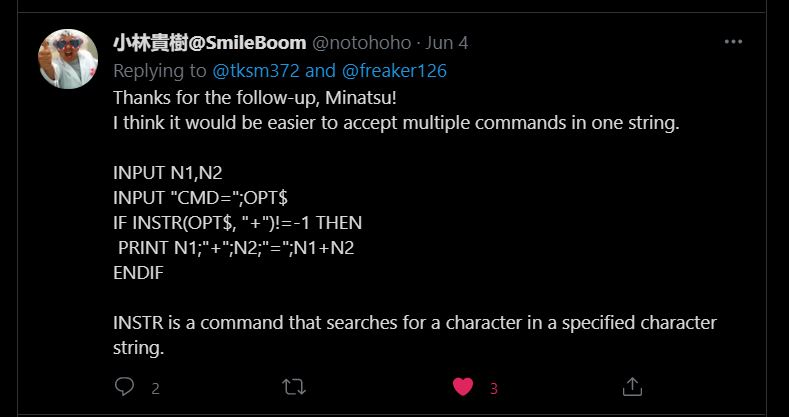

While @notohoho gave me this solution of using the command INSTR(OPT$,"").

I tried both of the solutions and it didn't work at first. It was only when I realized that I had put the endif at the wrong place. You can see the pics of my earlier code where I've placed all the endif at the bottom, instead of after every if. That's basically how I learn, from trial and error.


I decided to add an option "x" where the user can get all the calculation answers at once. Kinda cool!


The second part of the final code. Of course, you can copy these. Add anything you want to it. I was even thinking of adding background music. I can even upload it to the SmileBASIC server but I'm lazy. There are others that already upload better calculator apps.

You can watch the video and see how it works here


Nintendo Switch with Neon Blue and Neon Red Joy‑Con - HAC-001(-01)

If you had gone to visit the C# tutorial page, you'll see that the console calculator looks similar to the one I created using SmileBASIC 4. There's actually more to the C# tutorial and personally, the code is more 'cumbersome' to me. While with SmileBASIC4, it looks much simpler.

That's part of another reason why I like SmileBASIC. It's simplicity. I guess it's meant to be easy. For learning purposes. For a newbie like me? Also, with the Nintendo Switch, its portability meant, you can bring it and code anywhere. I actually code this calculator while in bed using the on-screen keyboard.

I'm self-learning coding just for fun and basic knowledge. Like I've said, I've been wanting to learn to code since I was a child. The kids nowadays are so fortunate that there are many programs suited for their age to learn. The good thing is that because of the Internet, it's much easier to research and learn online.

If you're interested, come join the fun!

What you guys think?

Help support this blog and youtube channel. Buy me Coffee @

https://www.buymeacoffee.com/W04oadL

*Shop the latest deals from Amazon via our links to support us. Tq!

Subscribe to our blog and youtube channel for the latest post and video upload!

Happy coding!


P.S. Nintendo Switch Lite - Blue


Saturday, May 29, 2021

Nintendo Switch lite - How similar is SmileBASIC4 to Python?


Nintendo Switch Lite - Blue

Hey guys,

Check it out!

I like dabbling with Python since the day, I bought myself a Raspberry pi 3. I was interested in building my own smart car robot and they use python to control it. The good thing is that there are many tutorials online that you can easily follow.

Frankly, I had always wanted to learn to code but didn't get the chance to. When I first heard of the Raspberry pi, I didn't really think much about it. But when I saw that you can create your own smart robot, I decided to get one. That's how I discovered Python and found out how easy it is to learn.


Nintendo Switch Lite - Blue

One of the problems for me is that I don't have the discipline to keep learning. It's not as if I have to take a test for it. But, I like to try out new things and see if I can make them work. It's that eureka feeling that got me excited.

My favorite portable gaming console is the Nintendo Switch lite. When I discovered that I can learn to code and create my own games with SmileBASIC4 and FUZE4, I was really excited and bought both of them. I got more excited when I discovered that smilebasic and python are so much alike.


Oussirro HDMI USB C Hub Adapter for Nintendo Switch, 1080P Type C to HDMI Converter Dock Cable for Nintendo Switch


Gaming Keyboard and Mouse and Mouse pad and Gaming Headset, Wired LED RGB Backlight Bundle for PC Gamers and Xbox and PS4 Users - 4 in 1 Edition Hornet RX-250

If you have the Nintendo Switch, you can link to your TV for a bigger screen. It'll be much better for a full coding setup. You can't do that with the Switch lite. So, most of the time, I just try out code on my bed before going to sleep. But, I can still use a mouse and keyboard if I want to.

You can actually game with a mouse and keyboard on the Nintendo Switch but you need a console adapter. With that adapter, you can connect a mouse and keyboard and play like on a computer. This is the same kind of adapter that's also compatible with your Xbox and PS4.


Mario Kart Live: Home Circuit -Luigi Set - Nintendo Switch Luigi Set Edition

I wonder if someone in Nintendo had actually read my blog. Because I have talked about using my Nintendo Switch to control my raspberry pi 3 smart car before. And, now, they've come out with this? I'm also hoping that there will be a Mario Drone or something like that. You hear it here first!

Now, that will be really cool. Playing Mario or Luigi or Princess drone racing. Would be fun to be able to take videos while you're flying. Of course, you need a good camera, which the Switch doesn't have. I don't know why there is a camera on the 3DS but no camera on the switch?


Coding Games in Python (Computer Coding for Kids)

I actually didn't know or did I? That smilebasic for the 3DS was already available back then. I was wondering if the software is available so that I can use it on my phone with an emulator. Lo and behold! Now, I can use smilebasic 3ds on my phone. Check out my video demo here.

What I like about python is that you can use it practically anywhere. I have a version of it on my phone so that, I can try code whenever I've got an idea. Or if I've learned something new and want to try it out. That's what so great about the smartphone today. It's a powerful mini-computer inside your pocket!


Samsung Electronics Galaxy Z Fold 2 5G | Factory Unlocked Android Cell Phone | 256GB Storage | US Version Smartphone Tablet | 2-in-1 Refined Design, Flex Mode | Mystic Black (SM-F916UZKAXAA)

That's why, if I have the money and it's becoming cheaper, I want to get the Samsung Z Fold 2 or future Z Fold 3? I want to open it up halfway and use it as a laptop. Open it up fully and you can use it as a tablet. This is pretty much the future of mobile phone laptops.

What more do you need when you can practically do everything with a mobile phone? You can play games, check emails, social media, take pictures or videos, edit them and upload them on youtube to share with the world or just with your colleagues.

I want Samsung or Microsoft to expand on this idea and create the perfect blend of mobile phone laptops. They need to improve and think of new innovations for a mobile phone that can be close and use as a phone or open up and use as a laptop or tablet.

Once they have that, it'll be way cool to use Visual Studio, the Android version.

What you guys think?

Help support this blog and youtube channel. Buy me Coffee @

https://www.buymeacoffee.com/W04oadL

*Shop the latest deals on Amazon via our links to support us. Tq!

Subscribe to our blog and youtube channel for the latest post and video upload!

Happy coding!


P.S. Coding Games in Python (Computer Coding for Kids)


Friday, February 26, 2021

Keyboard Case for Nintendo Switch lite? SmileBASIC4 keyboard quick test


AKNICI Universal Folding Leather Folio Case Cover Stand & Micro USB Keyboard for 7" Tablets, 7 Inch Keyboard Cases for Yuntab Y88 Q88/MatrixPad S7/Pritom 7/Fusion5 7/Dragon Touch 7/Haehne 7/Winnovo 7

Hey guys,

Check it out!

I love the idea of using a Keyboard and Mouse with my Nintendo Switch or Switch lite. I've said it several times before, Nintendo should let the Switch have Mouse & Keyboard support. There are gamers who like to set up their Nintendo Switch like a desktop, so wouldn't it a plus to have the support?

For one thing, there is already software like SmileBASIC 4 (Nintendo eShop) and FUZE 4 (main site) which includes mouse and keyboard support. Obviously, because it's a learning software for learning to code games. There is a touchscreen keyboard but a physical keyboard is much better to have.


AKNICI Universal Folding Leather Folio Case Cover Stand & Micro USB Keyboard for 7" Tablets, 7 Inch Keyboard Cases for Yuntab Y88 Q88/MatrixPad S7/Pritom 7/Fusion5 7/Dragon Touch 7/Haehne 7/Winnovo 7

Currently, I'm kind of exasperated that nobody actually thought of designing a keyboard case for a mobile phone and a Nintendo Switch or Switch lite. I'm not sure if there's a market for it, but if you don't do it and test the product who would know?

I don't think it's even hard to make and produce for them as there are already many companies making keyboard cases for tablets and iPad. But, why aren't there any for a mobile phone and even for a Switch? Ok, granted that a keyboard case for a Switch will be kind of weird.


Armor3 “NuType” Wired Keyboard for Nintendo Switch

Talking about the keyboard, I found this product, Armor3 "NuType" wired keyboard for Nintendo Switch. I'm wondering why it's not a USB C-type connector. Yes, it's also compatible with other consoles but the Switch connection is using USB C-type. You'll need an adapter for the Switch.

There is also used to be a typing game for the 3DS (2DS). Called Learn With Pokemon: Typing Adventure. It actually comes with its own keyboard. I would really buy a typing game for the Nintendo Switch if it's available. Would be fun to play with my own keyboard or if there's a special physical keyboard edition.


Battle & Get! Pokemon Typing DS (black keyboard) [Japan Import]

What I really want is a keyboard case that I can install on my phone or Nintendo Switch permanently. Well at least, inside a case that you can attach to a keyboard. So, if you just want to use the phone you can take it off. The same goes with the Nintendo Switch.

For the phone, it'll be easier when you using a keyboard to chat or replying to an email. And, when you're done, you just close it like a laptop. Most big phones are almost 7 inches in size, so I'm pretty sure people don't mind if the keyboard case is a little bit bigger.


ZAGG - ProKeys Wireless Keyboard and Detachable Case - Backlit, Laptop-Style Keys - Multi-Device Pairing - Compatible with Apple iPad 10.2 inch, 103404702

Definitely, the keyboard has to be good or why bother? Although, I'm not sure how good it'll be if it's under 7-8 inches in size. There is a lot of design for the tablet and iPad, they can just borrow from that. I like the magnetic type where you can stick to your keyboard case.

They can design a magnetic keyboard case for the Nintendo Switch and mobile phone like my Samsung Note 10+. I can use it with the case or stick it to the keyboard when I want to use it. Of course, I can also permanently stick to the keyboard case or just use it as a stand.


Kibbol Detachable Keyboard Case for iPad 9.7", Bluetooth 5, One-Step Pairing, 60-Hour Typetime, 7-Color Backlit, Precisive Touchpad, Lightweight Keyboard Folio for iPad (6 Gen & 5 Gen), Air 2 (Black)

A keyboard case something like the design of the Kibbol detachable keyboard case. Which even has a touchpad. I'm hoping that one day, I can check out my emails, Twitter, or Facebook while I'm on my Nintendo Switch. So, having a keyboard case would be practical.

For now, I'm just happy to occasionally use a keyboard or keyboard case when I'm playing around with SmileBASIC 4. Of course, I can also use it with my tablet and mobile phone. Maybe, who knows we'll have a good keyboard case for mobile and a Nintendo Switch in the future.

What you guys think?

Support this blog and youtube channel. Buy me Coffee @

https://www.buymeacoffee.com/W04oadL

*Shop the latest deals from Amazon via our links to support us. Tq!

Subscribe to our blog and youtube channel for the latest post and video upload!

Happy typing!


P.S. AKNICI Universal Folding Leather Folio Case Cover Stand & Micro USB Keyboard for 7" Tablets, 7 Inch Keyboard Cases for Yuntab Y88 Q88/MatrixPad S7/Pritom 7/Fusion5 7/Dragon Touch 7/Haehne 7/Winnovo 7


Saturday, June 27, 2020

Nintendo Switch lite CYBERPUNK Cyber Protocol puzzle gameplay


Nintendo Switch with Neon Blue and Neon Red Joy‑Con - HAC-001(-01)

Hey guys,

Check it out!

Looking for a cyberpunk theme game to play on your Nintendo Switch? Then, check out Cyber Protocol (eShop). Now, on a deal for $0.99!

I actually took a look at the game couple of times because I thought it's some kind of programming or coding game. I love that kind of game. Where you learn how to code and game at the same time. But, turn out it's not. Just a game theme where you 'hack' to save your android friend.


Nintendo Switch with Neon Blue and Neon Red Joy‑Con - HAC-001(-01)

Cyber Protocol (eShop) is an arcade puzzle game set in the Cyberpunk scenario with strong and dynamic gameplay. You impersonate the main hero, whose mission is to bring his Android friend (G0X6) back to life by activating the protocol.


When I watch the site gameplay video, I wasn't exactly sure how you play the game. I was still wondering if I should get the game even though it's on a deal. I basically say, what the heck and make the plunge!

In the game, you 'hack' by going through level after level of puzzles that have many intricate traps that will zap you if you make the mistake. You won't exactly die, just that you have to restart from the starting point of the level. But, you can opt to save at half-way checkpoint so that you won't have to go all the way back.


It's not until I reach the 2nd and third level that it gets harder and harder. You have to be careful not to hit the firewall or stay for too long before being zap by traps. You'll have to think your way through those traps and move fast before being zap by laser or whatever.

This is a single playing game but you can invite friends or family members to challenge and see who can clear the puzzle faster. 

Here's some more info on the game below: (Taken from game eShop game info)

  • COMPETITIVE - Share the fun with your family and friends - Cyber Protocol invites up to 4 players to take up the challenge locally! Be careful, only the best hackers can pass it without harm.
  • FOR CHALLENGERS - Looking for more adrenaline? Try hacking the system in the arcade mode at an increased pace and with limited lives. The task is hard, but if you are good enough, you can get your place in the top 20 global rankings of cyber hackers! Glory, fame, and success - it all can be yours!
  • FOR RETRO FANS - Miss retro games style? Don't worry - we got you covered! Throw away your old, dusty console, progress in the game, and travel back in time to the ’80s by changing game themes and sounds.
  • MUSIC PLAYER - If you want to relax after the hard work of hacking, sit back and listen to the Cyber Protocol’s Synthwave and 8bit soundtracks before going to the next challenge!


Wireless Controller for Nintendo Switch, Ergonomic Controller for Nintendo Switch with Gravity Induction of Six-Axis Gyroscope, Double Motor Vibration and Screen Capture Button

I really like the music player. And, the song isn't bad either. I like listening to youtube music on my switch lite before I sleep. So, it'll be great to listen to some cyberpunk music available on this game. Again, I'm not sure why Nintendo doesn't have a music player on the switch!?

The Nintendo switch can definitely be more than just a gaming system. With programming learning software like FUZE4 and smileBASIC4, it becomes an educational tool. If we have a chrome browser app, we can surf, check emails, read ebooks and so much more!

Go get the game now before the deal is off!

What you guys think?

*Shop the latest deals from Amazon via our links to support us. Tq!

Subscribe to our blog and youtube channel for the latest post and video upload!

Happy cyber hacking!


P.S. Nintendo Switch with Neon Blue and Neon Red Joy‑Con - HAC-001(-01)