Showing posts with label microbit. Show all posts

Saturday, June 05, 2021

Nintendo Switch lite - SmileBASIC4 - Coding Console Calculator


Nintendo Switch Lite - Blue

Hey guys,

Check it out!

One of the things I like about my Nintendo Switch lite is that I'm not just using it for gaming. I like watching videos on Youtube and also listening to music. No Netflix? No Spotify? Well, you just need youtube. Once awhile, I'll post pics and short clips videos on Facebook or Twitter.

Another thing I like is the software SmileBASIC4 and FUZE4. Although, I mostly spend my time with SmileBASIC more. You can learn to code games and play them on your own Switch. What I really like about SmileBASIC is that it's not just for games. The language is pretty much similar to BASIC and Python.


Nintendo Switch Lite - Blue

I'm more into Python because of Raspberry pi. I had always wanted to learn to code but didn't get the chance when I was in school. I only saw that you can create your own smart car robot with Raspberry Pi and Arduino that I was interested in. That's where I started to learn to code with Python.

The kids nowadays got the chance to learn about programming with Microbit. I actually got it for myself too. Playing with them is really fun. And, of course, it's more fun learning to program with 'toys' like this. Where you can literally see things work.


Adeept BBC Micro:bit Sensor Starter Kit | Microbit Programmable Starter Kit for Micro:bit with 35 Projects PDF Tutorial Book | Micro:bit and Expansion Board Included

Anyway, I played with Microsoft Visual studio and followed a tutorial to create a console calculator with C++. There's also a tutorial for C#. Instead of following the tutorial, I was wondering if I could take some of the code and create a console calculator on my Switch lite with SmileBASIC4.

I thought the core of the code in C# which is the calculation is pretty simple enough to redo with SmileBASIC. This is the part where knowing Python actually helps me. The fact that SmileBASIC is similar(almost) to BASIC and Python makes it much easier.


Learn C++ Quickly: A Complete Beginner’s Guide to Learning C++, Even If You’re New to Programming (Crash Course With Hands-On Project)

I was actually stuck with the INPUT problem in SmileBASIC 4. In python, I could easily let a user input to choose an option and then Print whatever I want. It keeps coming out with all the answers for plus, minus, multiplication, and divide.

I thought to just let it be. I don't think there's any calculator in the world that gives out an answer all at once. Lol. In the end, I decided to ask @notohoho, the CEO of Smileboom on Twitter. He was kind enough to answer my question the last time. Thankfully, he was also keen to help me this time around too.


I was stuck trying to print the option of the user with the INPUT command.


Probably, one of the @notohoho students or SmileBASIC users gave me a solution of using the command OPTION aka opt$.
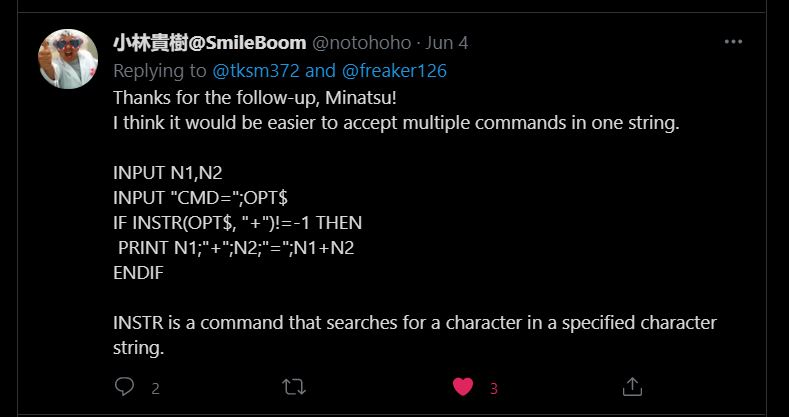

While @notohoho gave me this solution of using the command INSTR(OPT$,"").

I tried both of the solutions and it didn't work at first. It was only when I realized that I had put the endif at the wrong place. You can see the pics of my earlier code where I've placed all the endif at the bottom, instead of after every if. That's basically how I learn, from trial and error.


I decided to add an option "x" where the user can get all the calculation answers at once. Kinda cool!


The second part of the final code. Of course, you can copy these. Add anything you want to it. I was even thinking of adding background music. I can even upload it to the SmileBASIC server but I'm lazy. There are others that already upload better calculator apps.

You can watch the video and see how it works here


Nintendo Switch with Neon Blue and Neon Red Joy‑Con - HAC-001(-01)

If you had gone to visit the C# tutorial page, you'll see that the console calculator looks similar to the one I created using SmileBASIC 4. There's actually more to the C# tutorial and personally, the code is more 'cumbersome' to me. While with SmileBASIC4, it looks much simpler.

That's part of another reason why I like SmileBASIC. It's simplicity. I guess it's meant to be easy. For learning purposes. For a newbie like me? Also, with the Nintendo Switch, its portability meant, you can bring it and code anywhere. I actually code this calculator while in bed using the on-screen keyboard.

I'm self-learning coding just for fun and basic knowledge. Like I've said, I've been wanting to learn to code since I was a child. The kids nowadays are so fortunate that there are many programs suited for their age to learn. The good thing is that because of the Internet, it's much easier to research and learn online.

If you're interested, come join the fun!

What you guys think?

Help support this blog and youtube channel. Buy me Coffee @

https://www.buymeacoffee.com/W04oadL

*Shop the latest deals from Amazon via our links to support us. Tq!

Subscribe to our blog and youtube channel for the latest post and video upload!

Happy coding!


P.S. Nintendo Switch Lite - Blue


Monday, September 14, 2020

Microsoft MakeCode for Adafruit Circuit Playground Express


Adafruit Circuit Playground Express

Hey guys,

Check it out!

I didn't know that there's a Microsoft MakeCode for Adafruit Circuit Playground Express. Well, maybe it's been up for a while after I stop playing with my raspberry pi and other boards. It's not that I've lost interest, but I've been busy with other stuff. I'm still dabbling with coding though, that's how I found out about the MakeCode.

You can also play with Adafruit Clue and CPE simulator in Microsoft Visual Studio Code (download page). There's an extension for them. I don't have the board so, playing with the coding and testing on the simulator is kinda interesting and fun. I was actually hoping that there's an Arduino and Raspberry pi simulator but for now there's none.


Adafruit Circuit Playground Express

Playing with all this board is really fun and great knowledge to learn. The Arduino and Raspberry pi is actually designed for school students. But, it's been popular with hobbyists too. I consider myself a hobbyist for AI and machine learning just for the heck of it. Also, it kinda good to train my lazy brain to learn new interesting technology.

The good thing is that, nowadays, every information you need can be found online. Most of the time, I'll search through Google to find certain codes and try it out. If it doesn't work, I'll try another one. Sometimes though, the information can be 'old'. Like certain code doesn't work anymore because it's been updated. 


Adafruit 2769 Circuit Playground Express Educator's Pack

I guess that's part of learning. What makes it all worthwhile when dabbling with all these boards and their microcontroller is seeing it work. There'll be a time when you're stuck and can't seem to make any progression and then you change a bit of code or try another code and it all falls in place. That eureka moment is what you've looking for. 

There was a time when I'm feeling frustrated and I'll spend hours on it. I've learned that sometimes, you just have to relax and do other stuff. Banging your head on the wall will not help (kidding). It might take a few days but new ideas might come to you while you're walking around, doing some house cleaning, cooking, or whatever.  


Adafruit Circuit Playground Express Developer Edition - Base Kit

In any case, it's just something I enjoy doing. Trying to make things work and solving technical problems. You got that feeling of self-accomplishment. Maybe, that's why it seems to be quite popular. It's also good that they're pushing this in school. Like the micobit which I've actually bought and play with. Even create my own games.

For some reason, I like playing with all these 'toys'. Also, at least, it's something practical when you code something and see it works on a mini-computer board. Who knows, in the near future later you'll begin to see more robots everywhere. Heck, there are already robot waiters in restaurants and military dogs right now. 

I don't think we're that far off. Especially, when the pandemic now shows how important robots could be.

What you guys think?

Don't forget to check out my demo video.

You can donate to my blog and youtube channel by buying me coffee + pizza @

https://www.buymeacoffee.com/W04oadL

*Shop the latest deals on Amazon via our links to support us. Tq!

Subscribe to our blog and youtube channel for the latest post and video upload!

Happy computing!


P.S. Adafruit 2769 Circuit Playground Express Educator's Pack


Wednesday, September 02, 2020

Microsoft Visual Studio Code - Device simulator Express - Microbit


micro:bit BBC2546862 go, Original Version

Hey guys,

Check it out!

I think it was almost 2 years ago that I bought the micro:bit and played around with it. I was already having fun with my Raspberry Pi back then. That's also when I started to learn coding with Python. Learning Python got me to the road in learning to code.

I don't play much with either the Raspberry pi or the microbit nowadays. But, I still dabble with python. A week ago, I downloaded Microsoft Visual Studio code because you can also use the Windows Subsystem for Linux (WSL) in it. 


micro:bit BBC2546862 go, Original Version

While playing around with python in the VSC, I thought maybe, there's a microbit extension too. That's where I found the Device Simulator Express. The ability to code for microbit and test it on the simulator. I'm really loving Visual studio code now.

You can find and download the DSE from inside the VSC extensions marketplace. For kids and beginner to microbit and coding, they can go to microbit.org. Microbit has visual coding programming software that you can use online to code for your microbit.


Emakefun Robot kit 4 in 1Coding Robot for Microbit STEM Education Programmable DIY Toy Car for Kids

It is really fun to learn to code but what is more, fun is when you can make something move, light up or make sounds. That's what I like about the raspberry pi. Then, when the cheap or free BBC Microbit comes along, it's another new toy for me to play with.

Obviously, I'm not a kid. But, the kid in me likes playing with all these modern toys. This is actually great for adults too. Especially, us that has always wanted to learn but didn't get the chance. I would even say, it's great to let old folks get their brain working playing with coding and robots.


Keywishbot Micro bit Starter Kit, Electronic microbit Starter Kit for BBC Micro:bit with 33 Lesson Tutorial

I can see already see an interesting future even at this time of the covid-19 pandemic. I just read on Twitter that two pilots saw a man in a jetpack flying around 3k feet. They're investigating. And, a couple of months back Robo dog send to monitor people on social distancing.

In Japan, the robot waiter is sending them their ordered food. I remember seeing a documentary on exos-skeleton. I can bet you the military would be using Robo soldiers soon. I think I saw a youtube promo on that subject. But, I didn't watch it.


Elecfreaks microbit Smart Coding Kit for Kids BBC Micro:bit DIY Programmable Watch, Wearable microbit Extension Board(Wear:bit) for Micro:bit Beginners and Student (Without Micro:bit)

The kids in the future would be so well-versed in AI, robotics, and coding, they can practically design and create anything. That's actually what the young in China are doing now. They're growing exponentially. Just look at the markets right now. Most of the products are from China!

China have gone to the moon and they're planning to go to Mars. There's an old saying, learn even if you have to go to China. Was it a prophecy or an acknowledgment of how good the Chinese are or is? People used to look to the west and also Japan didn't they? What happened?

Well, the BBC microbit and Raspberry Pi is a good start for the young, definitely. But, China's young is the one reaping the rewards now. The sleeping dragons is definitely awake now!

What you guys think?

*Shop the latest deals from Amazon via our links to support us. Tq!

Subscribe to our blog and youtube channel for the latest post and video upload!

Happy coding & computing!


P.S. micro:bit BBC2546862 go, Original Version


Tuesday, February 13, 2018

Scratch Coding - My Brick Breaker Tunnel game demo gameplay


scratch coding cards creative coding activities for kids

Hey guys,

Check out my new 'Brick Breaker Tunnel' game!

https://scratch.mit.edu/users/alongcat/

I created using Scratch coding today. All artworks and sound effects from Scratch sample. Finally, learned how to add score by adding, "Score" variable. I also did some editing on my other games that I've created. Check them out if you haven't!

If you're interested or want your kids to learn then check out the site and some of the books available below on coding with Scratch. It's really fun and I've really learned a lot since, I bought my arduino and raspberry pi 3 package.

I also bought myself the BBC Micro:bit and learn coding using their javascripts block. Definitely, a lot of resources and products you can buy for yourself or for your children to learn while they're still young. Make 2018 a year of learning coding!


scratch coding cards creative coding activities for kids


coding games in scratch


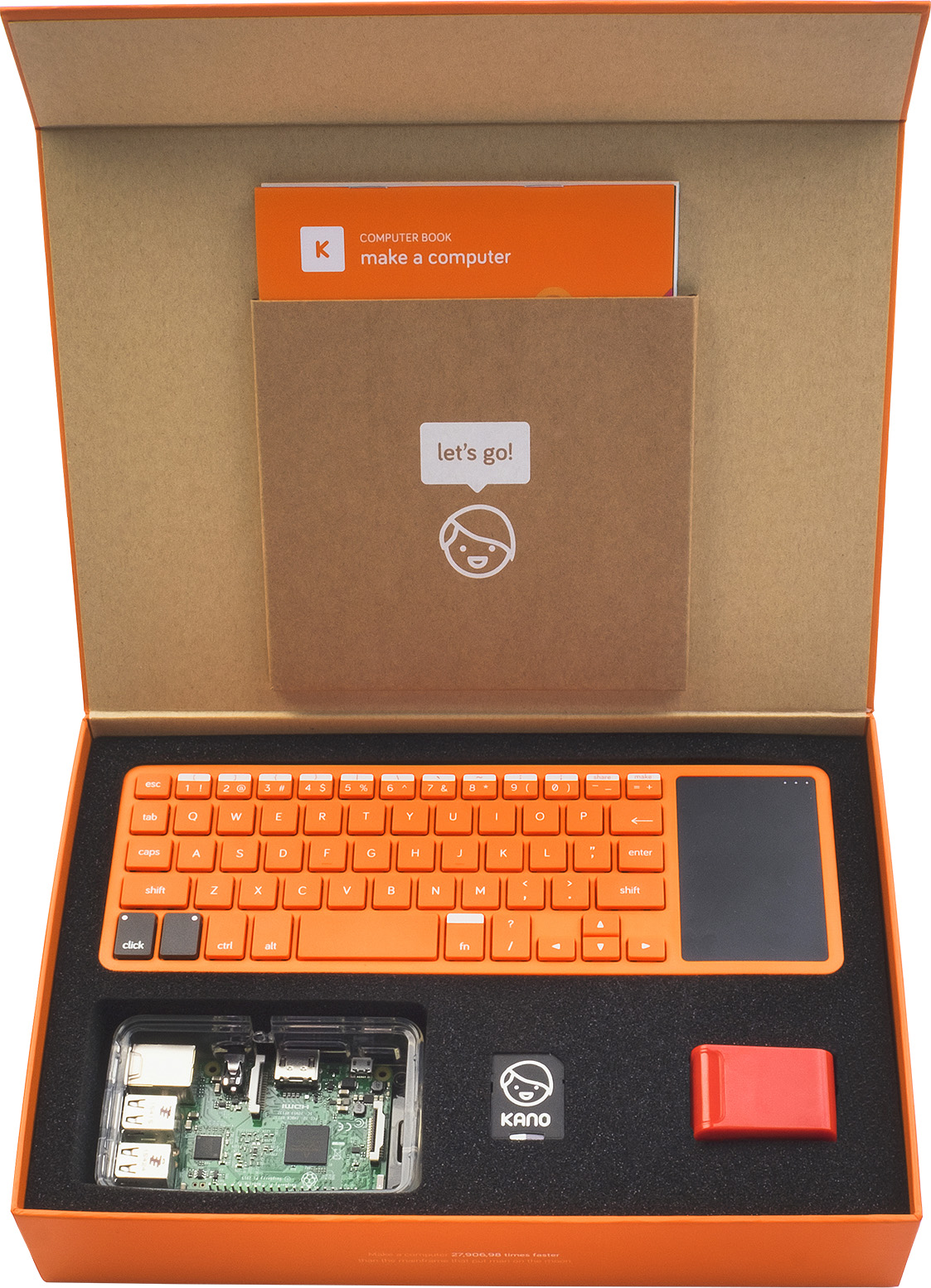
Kano Computer Kit


Maker Studio AK0000510M Arduino Uno R3 Learning Advanced Kit - Multicolored


Raspberry Pi 3 Model B Project Board Development Board Linux Mini PC BCM2837 quad-core ARM Cortex-A53 with Rainbow Case

It's fun and it's practical. Everyone, loved doing their own DIY and learning to code or even being able to build their own smart robot. Make the new year, a year of learning!

Don't forget to check out my video and subscribe!

Happy coding!

P.S. scratch coding cards creative coding activities for kids