Showing posts with label switch lite. Show all posts

Sunday, April 09, 2023

It is still fun playing Pokémon typing adventure game on my 3ds xl


Learn with Pokémon: Typing Adventure DS (EU Import)

Hey guys,

Check it out!

I was a little bored and decided to take out and play the Pokemon typing adventure game. I love typing games and only recently got the Pokemon typing version. I know, kinda a little bit late. But, I saw it was in the sale, so I decided to get it. Wasn't disappointed.

The Pokemon typing adventure is an awesome game. They should keep selling the game and port it to the Nintendo Switch. Better yet, create a new version of the game. Did you know you can link and play your keyboard and mouse to a Nintendo Switch? Check out some of my gameplay here.


Learn with Pokémon: Typing Adventure DS (EU Import)

If you like to learn to code and code your own Nintendo Switch game, I recommend that you get the software SmileBASIC4 at the Nintendo online store. You can also use a keyboard with it. Obviously, since you need to type the code. I've managed to mod the sample code and create my own games.

I don't know why it's been years since the Nintendo Switch came out and there are already many Pokemon games available but they never thought of developing the Pokemon typing game. I'm kinda pissed. Doesn't help that the game CEO didn't think the switch will be as popular back in the early days.


Battle & Get! Pokemon Typing DS (white keyboard) [Japan Import] (works only with Japan consoles)

Anyway, now you can buy a keyboard and mouse converter to play some shooter and RPG games on the Nintendo Switch. But, you'll also need a USB C adapter. It's the same kind of converter that you use when playing xbox games. The USB C to A is for the switch.

When you buy a USB C to A adapter make sure it's the type that can also charge your Nintendo Switch. If not, you'll have to take it out and charge it separately. You can plug your gaming keyboard and mouse into the converter. Yes, kinda a hassle. But, it works.


USB C Hub HDMI 4K 60Hz, Type C Adapter with 100W Power Delivery, 3 USB 3.0 Data Ports, HDMI, Dockteck 5 in 1 USB-C Dock Dongle for MacBook Pro/Air, iPad Pro/Air/Mini 6, Surface Pro 7/8/9 and More

It's actually been a while since I stopped gaming on my Nintendo Switch Lite. So, I'm not sure if there are any updates on being able to wireless link your keyboard and mouse to the switch. It'll definitely save you money and time. Though, you still can't dock your switch lite to a Tv or monitor.

I don't know why Nintendo doesn't want us to be able to link our mouse and keyboard to the switch. I get it, it's supposed to be portable and you can even dock to a big screen tv to play with your external controller. But, it'll be cool to be able to play FPS or RPG with a mouse and keyboard like a PC too.


Mouse and Keyboard Converter for Nintendo Switch, Keyboard and Mouse Adapter for PS4, PS3, Xbox One, Xbox 360, Nintendo Switch lite

This is actually not the first time I've been talking about being able to play Nintendo Switch games or mobile games with a mouse and keyboard. In the early days, there are no support for them. Now, you can even connect the latest Xbox controller with Bluetooth to your mobile phone.

I'm not sure if now you can connect the xbox controller to a Nintendo Switch. That'll be awesome. In any case, there are already many good third-party external controllers for your switch. I like my transparent case type. Looks pretty cool. Especially, when playing in the dark.

What do you guys think?

Help support this blog and youtube channel. Buy me Coffee @

https://www.buymeacoffee.com/W04oadL

*Shop the latest deals on Amazon via our links to support us. Tq! :)

Subscribe to our blog and youtube channel for the latest post and video uploads!

Happy typing!

#pokemon #pokemontypingadventure #nintendo #nintendoswitch #nintendoswitchlite #typinggames

P.S. Learn with Pokémon: Typing Adventure DS (EU Import)


Sunday, January 29, 2023

this is Diablo Immortal with Ipega red knight 9087s #shorts

ipega-PG-9087S Wireless 4.0 Game Controller Gamepad Joystick for Samsung GALAXY S10 /S20/ NOTE10 OPPO VIVO Xiaomi LG Smart Android Mobile Phone Tablet (Android 6.0 and above)

Hey guys,

Check it out!

Admittedly, it has been a while since I've played mobile games. Okay, any kind of game. Been busy with my cycling and photography projects. But, since it's rainy season and I can't go out, I decided to take out the Ipega red knight 9087s and see if I can play any games on my iPhone 13.

Well, I can connect to the iPhone but the control buttons aren't working. I tried everything and finally gave up. Again, my Samsung S22+ case design is making it difficult to fit in but somehow I managed to. It's definitely much easier to connect and play on an Android mobile device.


ipega-PG-9087S Wireless 4.0 Game Controller Gamepad Joystick for Samsung GALAXY S10 /S20/ NOTE10 OPPO VIVO Xiaomi LG Smart Android Mobile Phone Tablet (Android 6.0 and above)

I did an unboxing and blogging about the ipega red knight controller a couple of years back. You can watch the unboxing video here and more on my youtube channel. The good news is, it still works fine. And, I prefer the mode press Home+X for RPG, racing, fighting, and retro gaming.

I tried playing the new Diablo Immortal with the 9087s and it works right out of the box. I don't even need the V3 buttons mapping software. Which you can download from the Google play store. I like how the design and color of the red buttons fit the overall look theme of the game. 


Razer Kishi Mobile Game Controller / Gamepad for Android USB-C: Xbox Game Pass Ultimate, xCloud, Stadia, GeForce NOW, Luna - Passthrough Charging - Low Latency Phone Controller Grip - Samsung, Pixel

Someone said the thumbstick is kinda small. He's right. I have small hands and even I think it's too small. It doesn't feel as good as an xbox one s controller. Notice that I said Xbox one s. It's the only controller that I have tried connecting via Bluetooth with my Samsung Android phone.

Yes, you can connect and play mobile games with an xbox one s controller, if you didn't already know. I'm assuming, that all the latest xbox controllers can do this now via Bluetooth unlike in the past. Where you have to buy a PC version of the xbox 360 controller. Check out my old video from 11 years ago here.


Xbox Core Wireless Controller – Mineral Camo (Special Edition)

One more thing, if you don't know is that with Samsung Dex, you can play mobile games on a bigger screen like a portable monitor or even a Tv. Connect your xbox controller, and voila! It's like gaming on a console. Pretty cool. Check out my video here and more if you're interested.

In the early days, mobile gamers like me used to lament about the lack of ability to play mobile games with a physical controller. Nowadays, you're spoilt for choice. There are so many mobile game controllers that it pretty much depends on your budget, best build, and most importantly good games with controller support.


GameSir X2 Pro-Xbox Mobile Game Controller for Android Type-C (100-179mm), Phone Controller for xCloud, Stadia, Luna - 1 Month Xbox Game Pass Ultimate -Passthrough Charging (Black)

Well, I just discovered the GameSir X2 pro-Xbox, approved mobile game controller. It even comes with 1 month's xbox game pass. I might check this out later on. Imagine, being able to stream play your favorite xbox games and play them on the go.

Mobile gaming or portable gaming has really come far. From being able to play full console-quality games on your laptop and other portable devices like the Nintendo Switch or Switch lite to now your mobile phone. How cool is that? If you search through my blog post, I have been wanting this for years!

Well, who would have imagined being able to play Diablo on a mobile phone with a mobile controller, eh?

What do you guys think?

Help support this blog and youtube channel. Buy me Coffee @

https://www.buymeacoffee.com/W04oadL

*Shop the latest deals on Amazon via our links to support us. Tq! :)

Subscribe to our blog and youtube channel for the latest post and video uploads!

Happy portable gaming!

#Diablo #DiabloImmortal #diabloimmortal #IPEGA #ipegaredknight9087s #mobilegaming #Samsung #iPhone13

P.S. ipega-PG-9087S Wireless 4.0 Game Controller Gamepad Joystick for Samsung GALAXY S10 /S20/ NOTE10 OPPO VIVO Xiaomi LG Smart Android Mobile Phone Tablet (Android 6.0 and above)


Friday, October 01, 2021

Hori Nintendo Switch Split Pad Pro Pac-Man Ergonomic Controller


Hori Nintendo Switch Split Pad Pro (Pac-Man) Ergonomic Controller for Handheld Mode - Officially Licensed By Nintendo and Namco - Nintendo Switch

Hey guys,

Quick promo!

I've bought several third-party controllers for my Nintendo Switch and even for the Switch lite. There are of course many available in the market. I saw this Hori Pac-man Nintendo switch split pad pro version and it really looks cool!

It's not in stock right now but you can pre-order it via the link below. Get it before it runs out of stock!


Hori Nintendo Switch Split Pad Pro (Pac-Man) Ergonomic Controller for Handheld Mode - Officially Licensed By Nintendo and Namco - Nintendo Switch

  • Full-size Controller experience in handheld mode
  • Larger grip, Buttons, triggers, analog sticks, and d-pad
  • Assignable rear triggers, turbo functionality, and more
  • Fun retro PAC-MAN design
  • Officially Licensed by Nintendo and BANDAI Namco


NAMCO MUSEUM ARCADE PAC - Nintendo Switch

What's better than playing the pac-man game with your new Hori retro Pac-man design controller!?

Get the game!

I love my Nintendo portable game console!

What do you guys think?

Help support this blog and youtube channel. Buy me Coffee @

https://www.buymeacoffee.com/W04oadL

*Shop the latest deals on Amazon via our links to support us. Tq!

Subscribe to our blog and youtube channel for the latest post and video upload!

Happy portable gaming!


P.S. Hori Nintendo Switch Split Pad Pro (Pac-Man) Ergonomic Controller for Handheld Mode - Officially Licensed By Nintendo and Namco - Nintendo Switch


Monday, July 19, 2021

Valve announces Steam Deck - I'm sticking with my Switch lite


Nintendo Switch Lite - Blue

Hey guys,

Check it out!

My nephew suddenly msg me the other day and asked me if I have seen Steam Deck. I didn't know what it was and said I'm too busy to care. I decided to check what it's all about after I'm done with my work. Oh, it's a steam version of Nintendo Switch. I'm already seeing a youtube video headline for the death of the Nintendo Switch. lol :p

I think it's only available at the end of the year if I can remember correctly. Meanwhile, the new Nintendo Switch Oled will arrive in October. You can check it out on the Amazon link here. One thing for sure, it's much cheaper than a Steam Deck.


Nintendo Switch Lite - Blue

Looking at the Steam Deck design, the first thing you see is the weird placement of the control buttons and two pads located on both sides of the 7 inch LCD screen. There's nothing special about the trigger buttons. Looks the same as a Switch.

I wish they had proper triggers like an Xbox controller. Oh yeah, there are 4 special paddles behind the deck just like the elite Xbox controller. I'm assuming you can set it up to your own preferences. Other than that, physically it looks like and probably weighs the same as a Nintendo Switch.


Nintendo Switch (OLED model) w/ White Joy-Con

"We partnered with AMD to create Steam Deck's custom APU, optimized for handheld gaming. It is a Zen 2 + RDNA 2 powerhouse, delivering more than enough performance to run the latest AAA games in a very efficient power envelope." - Taken from Steam Deck official page.

Personally, I'm not surprised they're using AMD products. There's actually already something similar created by a Chinese company a couple of months back. AMD is probably going to win this portable gaming computer. I'm not totally sure how good Intel mobile graphics are.


Retear Game Elite Traveling Backpack for Nintendo Switch, Carrying Storage Bag for PS4 Slim and Xbox ONE

How good will it play and for how long? I'm guessing maybe 2-3 hours of hardcore gaming. It's basically just like a gaming laptop. You can even use it as a laptop. Plugin your gaming keyboard and mouse, voila! You can also dock it to a big screen TV with your own compatible cables.

My Switch lite can't do that. What I worry about for the Steam Deck is when you start installing all the craps we always do on a laptop or PC and it will start to bog your system. If you like to tinker, it will be more than just a portable gaming console.


Nintendo Switch with Gray Joy‑Con - HAC-001(-01)

The Steam Deck is admittedly very interesting. As I've owned both the Nintendo Switch and Switch lite, I'm a little bias towards my current Switch lite. It's great for gaming, watching videos, and listening to music on youtube. That's basically what I do with it, every day.

If ever I'm getting the Steam Deck, I will probably tinker the heck out of it. Remember, it's basically a portable gaming pc. I can even use the integrated controller to control my raspberry pi car robot. I actually tried that before with my Powkiddy X18. Watch the video here.


Mario Kart Live: Home Circuit -Luigi Set - Nintendo Switch Luigi Set Edition

Now, you can also control a car with the Nintendo Switch. The Mario Kart Live. I wonder if Nintendo had read my blog post about it. I've been wanting to use my Switch to be able to control my Raspberry pi. Months later, they come up with Mario Kart. Coincidence?

The Steam Deck is very much different than the Nintendo Switch and it caters to different types of gamers. If you're a PC/Steam gamer, you'll probably get it. If you're into Nintendo products or consoles, you'll probably stick with the Switch. 

Right now, I'm sticking with my favorite portable gaming console, the Switch lite. I've already loads of games in it. I don't really need to buy another portable gaming console. Yes, I've many Steam games too, that's why I'm not counting out getting it, maybe in the near future.

What do you guys think?

Help support this blog and youtube channel. Buy me Coffee @

https://www.buymeacoffee.com/W04oadL

*Shop the latest deals from Amazon via our links to support us. Tq!

Subscribe to our blog and youtube channel for the latest post and video upload!

Happy portable gaming!


P.S. Nintendo Switch Lite - Blue


Saturday, July 03, 2021

The Legend of Zelda: Skyward Sword


The Legend of Zelda: Skyward Sword HD Standard - Switch [Digital Code]

Hey guys,

Quick promo!

The Legend of Zelda: Skyward Sword HD version is coming out for the Nintendo Switch on 16 July 2021!

It's available for both the Nintendo Switch and Switch lite. For the Nintendo Switch version, you can play it with a controller gyro. While using normal buttons for the Switch lite.

Get the game via the link below!


The Legend of Zelda: Skyward Sword HD Standard - Switch [Digital Code]

  • Soar between floating islands and Descend to the treacherous surface world In this updated HD version of The Legend of Zelda: Skyward Sword game.
  • Gently swing your Sword and angle your slashes to uncover and breakthrough opponents' Defenses using intuitive motion controls.
  • Movements feel smoother and more immediate thanks to the Nintendo Switch system's processing power and HD graphics. Take advantage of the newly-added button only control scheme-perfect for playing in handheld mode or on the Nintendo Switch Lite system


Nintendo Switch with Neon Blue and Neon Red Joy‑Con - HAC-001(-01)

The Nintendo Switch is still my favorite portable gaming console. With all the latest games and even great for listening to music and watching videos on youtube. I played games or watch youtube every night before I sleep.

What's so great about it? The portability. Sometimes, people associate portability with mobile games. Mobile games suck because most are touch games without controller support and worst, you need internet access. You can play your favorite Nintendo game on the go without wasting Internet data.

That's why the Nintendo Switch is the best portable gaming console! 

And now, you can even play, The Legend of Zelda Skyward Sword on the go!

What you guys think?

Help support this blog and youtube channel. Buy me Coffee @

https://www.buymeacoffee.com/W04oadL

*Shop the latest deals on Amazon via our links to support us. Tq! :)

Subscribe to our blog and youtube channel for the latest post and video upload!

Happy portable gaming!


P.S. The Legend of Zelda: Skyward Sword HD Standard - Switch [Digital Code]


Thursday, June 17, 2021

Amazon Best Sellers in Nintendo Switch Games


Nintendo Switch Lite - Blue

Hey guys,

Quick promo!

Check out some of the best sellers in Nintendo Switch games - Amazon store!

Get them if you haven't already!


Nintendo Switch Lite - Blue


Mario Golf: Super Rush Standard - Switch [Digital Code]


The Legend of Zelda: Skyward Sword HD Standard - Switch [Digital Code]


SanDisk 128GB MicroSDXC UHS-I Memory Card for Nintendo Switch - SDSQXAO-128G-GNCZN with Nintendo Switch Online Family Membership 12 Month - Nintendo Switch [Digital Code]


Game Builder Garage Standard - Switch [Digital Code]


New Pokémon Snap Standard - Switch [Digital Code]


The Great Ace Attorney Chronicles Standard Pre-Purchase - Switch [Digital Code]


Mario Kart Live: Home Circuit -Mario Set - Nintendo Switch Mario Set Edition

There are of course much more available on Amazon best sellers. These are just some of the games that you can get via online digital code. You'll need big storage to download them. I'm still using my 512GB MicroSD Card and so far, I've got no problem with it.

I actually just download the Game Builder Garage (trial version). It looks pretty interesting. As it's almost like SCRATCH coding for kids. Right now, I prefer learning to code games with SmileBASIC4. Which is also a build your own game program. 

That's pretty much why I love my Nintendo Switch lite. Besides all the best games available, you can also use them for entertainment and also as a learning tool. Pretty cool. Best of all, it's portable. Get one if you haven't!

Help support this blog and youtube channel. Buy me Coffee @

https://www.buymeacoffee.com/W04oadL

*Shop the latest deals from Amazon via our links to support us. Tq!

Subscribe to our blog and youtube channel for the latest post and video upload!

Happy portable gaming!


P.S. Nintendo Switch Lite - Blue


Saturday, June 05, 2021

Nintendo Switch lite - SmileBASIC4 - Coding Console Calculator


Nintendo Switch Lite - Blue

Hey guys,

Check it out!

One of the things I like about my Nintendo Switch lite is that I'm not just using it for gaming. I like watching videos on Youtube and also listening to music. No Netflix? No Spotify? Well, you just need youtube. Once awhile, I'll post pics and short clips videos on Facebook or Twitter.

Another thing I like is the software SmileBASIC4 and FUZE4. Although, I mostly spend my time with SmileBASIC more. You can learn to code games and play them on your own Switch. What I really like about SmileBASIC is that it's not just for games. The language is pretty much similar to BASIC and Python.


Nintendo Switch Lite - Blue

I'm more into Python because of Raspberry pi. I had always wanted to learn to code but didn't get the chance when I was in school. I only saw that you can create your own smart car robot with Raspberry Pi and Arduino that I was interested in. That's where I started to learn to code with Python.

The kids nowadays got the chance to learn about programming with Microbit. I actually got it for myself too. Playing with them is really fun. And, of course, it's more fun learning to program with 'toys' like this. Where you can literally see things work.


Adeept BBC Micro:bit Sensor Starter Kit | Microbit Programmable Starter Kit for Micro:bit with 35 Projects PDF Tutorial Book | Micro:bit and Expansion Board Included

Anyway, I played with Microsoft Visual studio and followed a tutorial to create a console calculator with C++. There's also a tutorial for C#. Instead of following the tutorial, I was wondering if I could take some of the code and create a console calculator on my Switch lite with SmileBASIC4.

I thought the core of the code in C# which is the calculation is pretty simple enough to redo with SmileBASIC. This is the part where knowing Python actually helps me. The fact that SmileBASIC is similar(almost) to BASIC and Python makes it much easier.


Learn C++ Quickly: A Complete Beginner’s Guide to Learning C++, Even If You’re New to Programming (Crash Course With Hands-On Project)

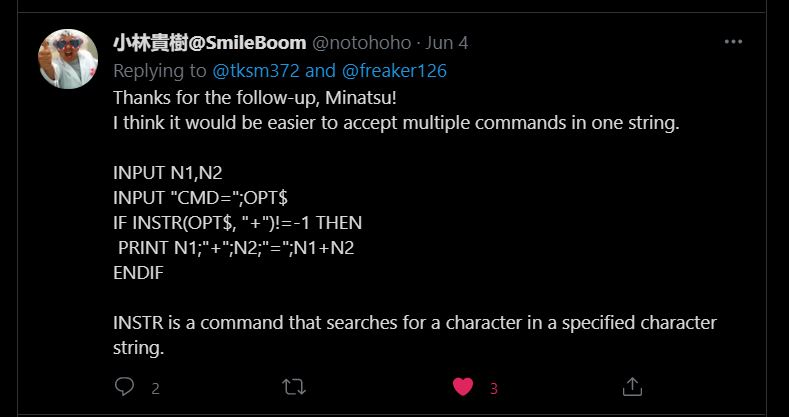
I was actually stuck with the INPUT problem in SmileBASIC 4. In python, I could easily let a user input to choose an option and then Print whatever I want. It keeps coming out with all the answers for plus, minus, multiplication, and divide.

I thought to just let it be. I don't think there's any calculator in the world that gives out an answer all at once. Lol. In the end, I decided to ask @notohoho, the CEO of Smileboom on Twitter. He was kind enough to answer my question the last time. Thankfully, he was also keen to help me this time around too.


I was stuck trying to print the option of the user with the INPUT command.


Probably, one of the @notohoho students or SmileBASIC users gave me a solution of using the command OPTION aka opt$.


While @notohoho gave me this solution of using the command INSTR(OPT$,"").

I tried both of the solutions and it didn't work at first. It was only when I realized that I had put the endif at the wrong place. You can see the pics of my earlier code where I've placed all the endif at the bottom, instead of after every if. That's basically how I learn, from trial and error.


I decided to add an option "x" where the user can get all the calculation answers at once. Kinda cool!


The second part of the final code. Of course, you can copy these. Add anything you want to it. I was even thinking of adding background music. I can even upload it to the SmileBASIC server but I'm lazy. There are others that already upload better calculator apps.

You can watch the video and see how it works here


Nintendo Switch with Neon Blue and Neon Red Joy‑Con - HAC-001(-01)

If you had gone to visit the C# tutorial page, you'll see that the console calculator looks similar to the one I created using SmileBASIC 4. There's actually more to the C# tutorial and personally, the code is more 'cumbersome' to me. While with SmileBASIC4, it looks much simpler.

That's part of another reason why I like SmileBASIC. It's simplicity. I guess it's meant to be easy. For learning purposes. For a newbie like me? Also, with the Nintendo Switch, its portability meant, you can bring it and code anywhere. I actually code this calculator while in bed using the on-screen keyboard.

I'm self-learning coding just for fun and basic knowledge. Like I've said, I've been wanting to learn to code since I was a child. The kids nowadays are so fortunate that there are many programs suited for their age to learn. The good thing is that because of the Internet, it's much easier to research and learn online.

If you're interested, come join the fun!

What you guys think?

Help support this blog and youtube channel. Buy me Coffee @

https://www.buymeacoffee.com/W04oadL

*Shop the latest deals from Amazon via our links to support us. Tq!

Subscribe to our blog and youtube channel for the latest post and video upload!

Happy coding!


P.S. Nintendo Switch Lite - Blue