Showing posts with label programming. Show all posts

Saturday, June 05, 2021

Nintendo Switch lite - SmileBASIC4 - Coding Console Calculator


Nintendo Switch Lite - Blue

Hey guys,

Check it out!

One of the things I like about my Nintendo Switch lite is that I'm not just using it for gaming. I like watching videos on Youtube and also listening to music. No Netflix? No Spotify? Well, you just need youtube. Once awhile, I'll post pics and short clips videos on Facebook or Twitter.

Another thing I like is the software SmileBASIC4 and FUZE4. Although, I mostly spend my time with SmileBASIC more. You can learn to code games and play them on your own Switch. What I really like about SmileBASIC is that it's not just for games. The language is pretty much similar to BASIC and Python.


Nintendo Switch Lite - Blue

I'm more into Python because of Raspberry pi. I had always wanted to learn to code but didn't get the chance when I was in school. I only saw that you can create your own smart car robot with Raspberry Pi and Arduino that I was interested in. That's where I started to learn to code with Python.

The kids nowadays got the chance to learn about programming with Microbit. I actually got it for myself too. Playing with them is really fun. And, of course, it's more fun learning to program with 'toys' like this. Where you can literally see things work.


Adeept BBC Micro:bit Sensor Starter Kit | Microbit Programmable Starter Kit for Micro:bit with 35 Projects PDF Tutorial Book | Micro:bit and Expansion Board Included

Anyway, I played with Microsoft Visual studio and followed a tutorial to create a console calculator with C++. There's also a tutorial for C#. Instead of following the tutorial, I was wondering if I could take some of the code and create a console calculator on my Switch lite with SmileBASIC4.

I thought the core of the code in C# which is the calculation is pretty simple enough to redo with SmileBASIC. This is the part where knowing Python actually helps me. The fact that SmileBASIC is similar(almost) to BASIC and Python makes it much easier.


Learn C++ Quickly: A Complete Beginner’s Guide to Learning C++, Even If You’re New to Programming (Crash Course With Hands-On Project)

I was actually stuck with the INPUT problem in SmileBASIC 4. In python, I could easily let a user input to choose an option and then Print whatever I want. It keeps coming out with all the answers for plus, minus, multiplication, and divide.

I thought to just let it be. I don't think there's any calculator in the world that gives out an answer all at once. Lol. In the end, I decided to ask @notohoho, the CEO of Smileboom on Twitter. He was kind enough to answer my question the last time. Thankfully, he was also keen to help me this time around too.


I was stuck trying to print the option of the user with the INPUT command.


Probably, one of the @notohoho students or SmileBASIC users gave me a solution of using the command OPTION aka opt$.
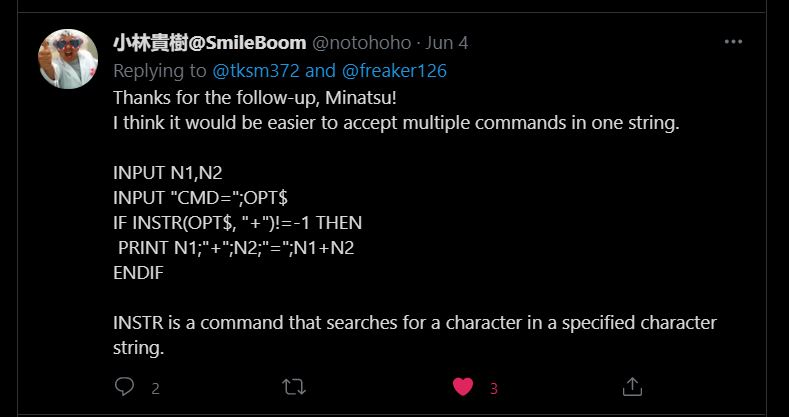

While @notohoho gave me this solution of using the command INSTR(OPT$,"").

I tried both of the solutions and it didn't work at first. It was only when I realized that I had put the endif at the wrong place. You can see the pics of my earlier code where I've placed all the endif at the bottom, instead of after every if. That's basically how I learn, from trial and error.


I decided to add an option "x" where the user can get all the calculation answers at once. Kinda cool!


The second part of the final code. Of course, you can copy these. Add anything you want to it. I was even thinking of adding background music. I can even upload it to the SmileBASIC server but I'm lazy. There are others that already upload better calculator apps.

You can watch the video and see how it works here. 


Nintendo Switch with Neon Blue and Neon Red Joy‑Con - HAC-001(-01)

If you had gone to visit the C# tutorial page, you'll see that the console calculator looks similar to the one I created using SmileBASIC 4. There's actually more to the C# tutorial and personally, the code is more 'cumbersome' to me. While with SmileBASIC4, it looks much simpler.

That's part of another reason why I like SmileBASIC. It's simplicity. I guess it's meant to be easy. For learning purposes. For a newbie like me? Also, with the Nintendo Switch, its portability meant, you can bring it and code anywhere. I actually code this calculator while in bed using the on-screen keyboard.

I'm self-learning coding just for fun and basic knowledge. Like I've said, I've been wanting to learn to code since I was a child. The kids nowadays are so fortunate that there are many programs suited for their age to learn. The good thing is that because of the Internet, it's much easier to research and learn online.

If you're interested, come join the fun!

What you guys think?

Help support this blog and youtube channel. Buy me Coffee @

https://www.buymeacoffee.com/W04oadL

*Shop the latest deals from Amazon via our links to support us. Tq!

Subscribe to our blog and youtube channel for the latest post and video upload!

Happy coding!


P.S. Nintendo Switch Lite - Blue


Tuesday, April 13, 2021

Controlling my STS-PI RASPBERRY PI ROBOT WITH POWKIDDY X18! #powkiddyx18 #raspberrypirobotcar


GPD XD Plus [Official distributor, Latest HW & Most Stable Update] Foldable Handheld Game Consoles 5" Touchscreen, Android 7.0 Fast Mediatek MT8176 Hexa-core 2.1GHz CPU, 4GB RAM/32GB ROM

(All links will open up in a new tab.)

Hey guys,

Check it out!

A couple of blog posts ago, I wanted to try if I could control my STS-Pi, a Raspberry Pi robot with the Powkiddy X18 integrated controller. I decided to dust off my R3 and make it happen. I have to research some of the things that I've forgotten.

My 16GB MicroSD cards with Recallbox and Raspbian OS wouldn't work. I haven't played with them for a while and I'm not sure why they won't work anymore. I had to re-format one of the cards that has a Kano OS.

GPD XD Plus [Official distributor, Latest HW & Most Stable Update] Foldable Handheld Game Consoles 5" Touchscreen, Android 7.0 Fast Mediatek MT8176 Hexa-core 2.1GHz CPU, 4GB RAM/32GB ROM

I love Kano OS. It's actually for kids to learn about computers and coding. I decided to re-download and install the old version of Raspbian-stretch because I need to use the Raspi-config to turn on my Raspberry Pi camera.

I'm using the same Raspberry Pi 3 that used to learn to make everything work. I didn't want the hassle of having to learn anything new now. If I can get the things that used to work and just try to use the Powkiddy X18 remap buttons, I'll then be able to control my sts-pi robot with the integrated controller.

Freenove 4WD Smart Car Kit for Raspberry Pi 4 B 3 B+ B A+, Face Tracking, Line Tracking, Light Tracing, Obstacle Avoidance, Colorful Light, Ultrasonic Camera Servo Wireless RC

I installed the Pimoroni software via the terminal. The web control didn't work when I tried to show it on my video, it suddenly stopped working. So, I just went straight to using SCRATCH. Using scratch to control my sts-pi motor is much easier.

Visit this site for more info on the STS-PI robot if you also have the Explorer Hat. For control using SCRATCH, go to this blog. Download the link for the scratch template and add the scratch code to the template. This way, you can control the motor and also take pictures at the same time. Pretty nifty.

PIM082 - Explorer HAT Pro for 40-Pin Raspberry Pi

Powkiddy X18 remap buttons work by just putting it to the scratch code. I also tried using the on-screen keyboard but, if you open the remap button, the keyboard will go away. I discovered that I can just use the remap button when I select the on-screen mouse available with the Raspbian OS. 

When you use the on-screen mouse, the arrow keys and several other useful keyboard keys are at the bottom of the screen. I tried putting the remap buttons on those keys and it finally works. So, now, I can control the motors with the integrated controller. Voila!


The Powkiddy X18 is really becoming my jack-of-all-trades device. I really like it. If I had known, it was not just for Android or retro gaming, I might have bought it much earlier. Maybe I wasn't ready for it.

When you're my age, you suddenly realize things seem to be happening for a reason and at the right time. I noticed it when my father died a couple of months before the virus was reported. He has diabetes and it would be pretty hard to see him during or if he dies during the pandemic.

I got fired from my job before the pandemic. No problem staying at home throughout the earlier days. I took the opportunity to blog and do YouTube videos. I want to thank those who bought stuff via my Amazon links as it helps.

I love tech and games!

What do you guys think?

Be among the first to help support this blog and YouTube channel. Buy me Coffee @

https://www.buymeacoffee.com/W04oadL

*Shop the latest deals from Amazon via our links to support us. Tq!

Subscribe to our blog and YouTube channel for the latest posts and video uploads!

Find something you love to do and you don't have to work for the rest of your life!

Happy portable computing!

#raspberrypi #powkiddyx18 #raspberrypirobot #python #coding #pimoroni #scratch

Wednesday, September 02, 2020

Microsoft Visual Studio Code - Device simulator Express - Microbit


micro:bit BBC2546862 go, Original Version

Hey guys,

Check it out!

I think it was almost 2 years ago that I bought the micro:bit and played around with it. I was already having fun with my Raspberry Pi back then. That's also when I started to learn coding with Python. Learning Python got me to the road in learning to code.

I don't play much with either the Raspberry pi or the microbit nowadays. But, I still dabble with python. A week ago, I downloaded Microsoft Visual Studio code because you can also use the Windows Subsystem for Linux (WSL) in it. 


micro:bit BBC2546862 go, Original Version

While playing around with python in the VSC, I thought maybe, there's a microbit extension too. That's where I found the Device Simulator Express. The ability to code for microbit and test it on the simulator. I'm really loving Visual studio code now.

You can find and download the DSE from inside the VSC extensions marketplace. For kids and beginner to microbit and coding, they can go to microbit.org. Microbit has visual coding programming software that you can use online to code for your microbit.


Emakefun Robot kit 4 in 1Coding Robot for Microbit STEM Education Programmable DIY Toy Car for Kids

It is really fun to learn to code but what is more, fun is when you can make something move, light up or make sounds. That's what I like about the raspberry pi. Then, when the cheap or free BBC Microbit comes along, it's another new toy for me to play with.

Obviously, I'm not a kid. But, the kid in me likes playing with all these modern toys. This is actually great for adults too. Especially, us that has always wanted to learn but didn't get the chance. I would even say, it's great to let old folks get their brain working playing with coding and robots.


Keywishbot Micro bit Starter Kit, Electronic microbit Starter Kit for BBC Micro:bit with 33 Lesson Tutorial

I can see already see an interesting future even at this time of the covid-19 pandemic. I just read on Twitter that two pilots saw a man in a jetpack flying around 3k feet. They're investigating. And, a couple of months back Robo dog send to monitor people on social distancing.

In Japan, the robot waiter is sending them their ordered food. I remember seeing a documentary on exos-skeleton. I can bet you the military would be using Robo soldiers soon. I think I saw a youtube promo on that subject. But, I didn't watch it.


Elecfreaks microbit Smart Coding Kit for Kids BBC Micro:bit DIY Programmable Watch, Wearable microbit Extension Board(Wear:bit) for Micro:bit Beginners and Student (Without Micro:bit)

The kids in the future would be so well-versed in AI, robotics, and coding, they can practically design and create anything. That's actually what the young in China are doing now. They're growing exponentially. Just look at the markets right now. Most of the products are from China!

China have gone to the moon and they're planning to go to Mars. There's an old saying, learn even if you have to go to China. Was it a prophecy or an acknowledgment of how good the Chinese are or is? People used to look to the west and also Japan didn't they? What happened?

Well, the BBC microbit and Raspberry Pi is a good start for the young, definitely. But, China's young is the one reaping the rewards now. The sleeping dragons is definitely awake now!

What you guys think?

*Shop the latest deals from Amazon via our links to support us. Tq!

Subscribe to our blog and youtube channel for the latest post and video upload!

Happy coding & computing!


P.S. micro:bit BBC2546862 go, Original Version


Saturday, June 27, 2020

Nintendo Switch lite CYBERPUNK Cyber Protocol puzzle gameplay


Nintendo Switch with Neon Blue and Neon Red Joy‑Con - HAC-001(-01)

Hey guys,

Check it out!

Looking for a cyberpunk theme game to play on your Nintendo Switch? Then, check out Cyber Protocol (eShop). Now, on a deal for $0.99!

I actually took a look at the game couple of times because I thought it's some kind of programming or coding game. I love that kind of game. Where you learn how to code and game at the same time. But, turn out it's not. Just a game theme where you 'hack' to save your android friend.


Nintendo Switch with Neon Blue and Neon Red Joy‑Con - HAC-001(-01)

Cyber Protocol (eShop) is an arcade puzzle game set in the Cyberpunk scenario with strong and dynamic gameplay. You impersonate the main hero, whose mission is to bring his Android friend (G0X6) back to life by activating the protocol.


When I watch the site gameplay video, I wasn't exactly sure how you play the game. I was still wondering if I should get the game even though it's on a deal. I basically say, what the heck and make the plunge!

In the game, you 'hack' by going through level after level of puzzles that have many intricate traps that will zap you if you make the mistake. You won't exactly die, just that you have to restart from the starting point of the level. But, you can opt to save at half-way checkpoint so that you won't have to go all the way back.


It's not until I reach the 2nd and third level that it gets harder and harder. You have to be careful not to hit the firewall or stay for too long before being zap by traps. You'll have to think your way through those traps and move fast before being zap by laser or whatever.

This is a single playing game but you can invite friends or family members to challenge and see who can clear the puzzle faster. 

Here's some more info on the game below: (Taken from game eShop game info)

  • COMPETITIVE - Share the fun with your family and friends - Cyber Protocol invites up to 4 players to take up the challenge locally! Be careful, only the best hackers can pass it without harm.
  • FOR CHALLENGERS - Looking for more adrenaline? Try hacking the system in the arcade mode at an increased pace and with limited lives. The task is hard, but if you are good enough, you can get your place in the top 20 global rankings of cyber hackers! Glory, fame, and success - it all can be yours!
  • FOR RETRO FANS - Miss retro games style? Don't worry - we got you covered! Throw away your old, dusty console, progress in the game, and travel back in time to the ’80s by changing game themes and sounds.
  • MUSIC PLAYER - If you want to relax after the hard work of hacking, sit back and listen to the Cyber Protocol’s Synthwave and 8bit soundtracks before going to the next challenge!


Wireless Controller for Nintendo Switch, Ergonomic Controller for Nintendo Switch with Gravity Induction of Six-Axis Gyroscope, Double Motor Vibration and Screen Capture Button

I really like the music player. And, the song isn't bad either. I like listening to youtube music on my switch lite before I sleep. So, it'll be great to listen to some cyberpunk music available on this game. Again, I'm not sure why Nintendo doesn't have a music player on the switch!?

The Nintendo switch can definitely be more than just a gaming system. With programming learning software like FUZE4 and smileBASIC4, it becomes an educational tool. If we have a chrome browser app, we can surf, check emails, read ebooks and so much more!

Go get the game now before the deal is off!

What you guys think?

*Shop the latest deals from Amazon via our links to support us. Tq!

Subscribe to our blog and youtube channel for the latest post and video upload!

Happy cyber hacking!


P.S. Nintendo Switch with Neon Blue and Neon Red Joy‑Con - HAC-001(-01)


Thursday, April 16, 2020

CORONAVIRUS COVID-19 AI ROBOT TAKING OVER HUMAN IS THE FUTURE


Makeblock mBot Ranger Transformable STEM Educational Robot Kit, a three-in-one educational robot kit for both learning programming and having fun

Hey guys,

Check it out!

The Coronavirus Covid-19 pandemic got me thinking. Everyone, been talking too. Will life ever be the same after this pandemic with social distancing? Will all outdoor activities, sports, concerts be a thing of the past?

We had a lot of new viruses coming out these few decades like SARS, MERS, HIV, ZIKA, EBOLA, etc. For one thing, they're getting stronger and mutated. The Covid-19 is one that transfers between humans pretty easily and fast. It's also unpredictable with mild or serious that you can die within a few days.


The Coming Pandemic

That's when I got thinking about how AI robots could be taking over our lives in the future. Of course, there are already certain industries that have been using robotics to produce our latest technology like cars and mobile phones.

Right now, you're not seeing any robots that are walking around doing an errand for us. Amazon actually using robotics in their warehouse and also drones for delivery. In this kind of pandemic that's better than depending on a human that could be infected.


Holy Stone HS110G GPS FPV Drone with 1080P HD Live Video Camera for Adults and Kids, RC Quadcopter with GPS Auto Return Home, Auto Hover and Follow Me Mode, Long Flight Time, Easy to Fly for Beginners

I watch a youtube video where neighbors are helping some elderly folks that couldn't go out to get their own medicals or food supplies. They send a dog to the neighbor with the supplies. The problem is there's a case of zoo animals being infected.

A drone can be used to send these supplies to your neighborhood without the worries of infection. It can be programmed to a location via GPS and timing. These are just an example of the use of technology. I'm waiting for the day where AI robots are doing things that normally a human will do.


AI, TRUMP, CHINA & THE WEAPONIZATION OF ROBOTICS WITH 5G: How China, Western AI, and Robotics Corporations Pose the Greatest Threat to People via Bio-Digital Social Programming & Why Support Trump?

AI robots and humans can co-exist. It's the future. It's a new kind of world that could help us survives, especially in times of pandemic when interactions between humans have to be controlled. Personally, I have no problem with this. As mostly I'm an introvert. I don't care much for another human contact.

I use social media and messaging apps to interact with my friends. Most of the time, I stay at home. I do go out sometime. But, only if I had to. Although, this could be because I'm at a certain age where I don't care much for the outside world. It was certainly different thinking when I was younger.


LEGO MINDSTORMS EV3 31313 Robot Kit with Remote Control for Kids, Educational STEM Toy for Programming and Learning How to Code (601 pieces)

Frankly, I'm surprised the military still hasn't built their own Mecha yet. What are they doing with all that money? Also, we still haven't created our first marketable AI robot. If they had, we would be seeing all these AI robots doing essential jobs without the need for PPE or personal protection equipment.

It's all in the educations of our future generations. And, the search for power that lasts. If humans need to survive and even to explore the universe for resources and survival. They need AI robots to do the work that humans can't.

What you guys think?

Subscribe to our blog and youtube channel for the latest post and video upload!

Happy Robotic!


P.S. Makeblock DIY Ultimate Robot Kit - Premium Quality - 10-in-1 Robot - STEM Education - Arduino - Scratch 2.0 - Programmable Robot Kit for Kids to Learn Coding, Robotics, and Electronics


Wednesday, July 18, 2018

iPad 6th gen space grey unboxing


Apple 9.7" iPad (6th Generation, 128GB, Wi-Fi Only, Space Grey)

Hey guys,

Finally! Got my 6th gen ipad. Mine is the cellular + wifi version. It's pretty light, compared to the first or second gen that I've had before. Yup, that's how long ago I've actually owned an ipad. I decided to get it when my telco offered an $0 upfront recontract.

There's a few accessories, I'll want to get later on. Like the ipad screen protector, keyboard case and also the apple pencil. Heck, I might even get an apple bluetooth mouse!

I've just got it delivered and haven't really gone through it. But, so far, I've a really good impression of it. The fact it's so light and thin, that I'm afraid I might drop it. Everything, seem fast. Granted, it's still pretty new and I have to update the iOS.

A funny story though. My delivery guy, wanted to open it up and test it. He said, if there's something wrong with it, he'll do the immediate replacement for me. But, I told him, I was pretty confident it would be okay. C'mon, it's Apple. It's been years and I've yet to received a defective product!

Well, I did have a problem with an Apple Macbook gold before. After, a couple of months usage, I noticed a small red tint on the screen. I thought, it was food or something. I managed to send it for screen replacement. Thank God, it's still under guarantee!

The iPad at this price, it'll be just great for me to play around with garageband and iMovie. I'm always using my phone before I sleep. Now, I'll be using my ipad instead to check email, watch youtube and social media. It helps, not to worry about recharging my phone again in the morning.

It only have 32gb of storage space and I'm already having to delete some apps that came from my last iPhone 7 backups. Why does it seem that we always need more space on our devices. It's becoming a bad habit to keep installing stuff that we don't even need or want!

There are some software that I want to test on it, especially for my raspberry pi. I'll be able to use VNC viewer to access it. I can use it to code using scratch and also link up and download to my microbit.

This is probably, the cheapest iPad ever that you can use for so many project!

Get the iPad 6th gen via the link below:


Apple 9.7" iPad (6th Generation, 128GB, Wi-Fi Only, Space Grey)


Keyboard Case for 2017 iPad 9.7 inch 5th Gen& iPad Air &2018 New iPad(6th Gen)-Backlit Bluetooth keyboard, Back Hard Folio Cover, Aluminium Alloy-For model:A1822/A1823/A1474/A1475/A1476/A1893


New iPad 9.7" (2018 & 2017)/iPad Pro 9.7/iPad Air 2/iPad Air Screen Protector, SPARIN Tempered Glass Screen Protector - Apple Pencil Compatible/High Definition/Scratch Resistant


EnvyDeal Grey Retro V-Bag Fits Apple iPad (1ST 3rd 4th 6th generation) iPad 2 iPad 3 iPad 4 iPad Air 2 Retina Display iPad Mini 2 3 Tablet


Jelly Comb 2.4G Slim Wireless Mouse with Nano Receiver Less Noise, Portable Mobile Optical Mice for Notebook, PC, Laptop, Computer, Macbook - White and Gold


Bluetooth Headphones Over Ear, Hi-Fi Stereo Wireless Headset, Foldable, Soft Memory-Protein Earmuffs, w/Built-in Mic and Wired Mode for PC/Cell Phones/TV (Red)


Apple Pencil for iPad Pro, White

Get yours today!

Looking forward to play around with my ipad!

Subscribe to my blog and youtube channel for latest post and uploads!

Have fun!


P.S. Apple 9.7" iPad (6th Generation, 128GB, Wi-Fi Only, Space Grey)