Latest games and tech news. Discover premium gadget reviews, exclusive Amazon deals, discount coupons, and seasonal sales. 🎮💻
Support Our Channel: Help us grow by letting ads run on our blog and YouTube channel! When you shop through our Amazon and advertiser links, we earn a small commission from qualifying purchases as an Amazon Associate (#ad). Thank you for supporting our content!
I haven't played with my raspberry pi 3 retro gaming kit for awhile. Since, there's a latest update, I took the time to update the system.
It was pretty quick and it got a nice new ui. So far, there doesn't seem to be any hiccups and I could play my favorite retro games and also watch videos or listen to music on kodi.
Recalbox, comes pre-installed with kodi. You can quickly, add on your favorite tv shows and movies. I'm not sure why but, I had to re-type my wifi network passwords to get connected if I restart.
Other then that, the menu all work great!
Get the latest raspberry pi 3 b+ retro gaming kit:
If you're like me, a retro gaming fan, you might want to check out the latest capability of raspberry pi 3 b+ with the ability to play 1000s of retro games!
Watch the video above on the kind of game you can download and play to your heart's content!
Build your own retro gaming rig with raspberry pi 3 b+. The latest, mini computer from element14. The raspberry pi are so cheap, you can buy more and do other projects like building your own smart robot.
Check out this latest offer with 50,000 retro games via the link below:
HELPS PROGRAMMING- Learn visual and graphical programming by computing code into the PiSmart Car, with a graphical user interface to make programming easier.
SPEECH RECOGNITION- Instead of remote control, the PiSmart Car uses speech recognition technology to move!
DURABLE DESIGN- The PiSmart Car is crafted with care to last the test of time.
DYNAMIC COMPATABILITY- An abundance of I/O ports are available for all uses and hook-ups
FUN FOR EVERYONE- The Pismart Car is a fun way for children and parents to work together to build and use.
The latest raspberry pi 3 B+ are such a powerful mini computer that you can even use it as your daily driver. Link it to a monitor and use it for work, play and learning computing!
Get it for yourself or for the kids today!
Subscribe to my blog and youtube channel for latest blog post and videos!
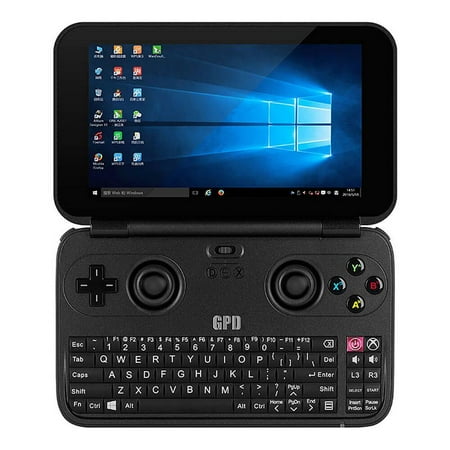
The best portable windows 10 machine that can play steam and retro games on the go!
Ok. It's not that powerful to run all your latest steam games but at least some of it. And, even then you'll have to manage your settings and preferences. The good thing is, since it's also a windows 10 computer, you can definitely install Retroarch and Kodi!
Being able to install Retroarch and Kodi are the most important thing for me. As with RetroArch, you can play 1000s of your favorite retro games and with Kodi as your ultimate multimedia system for watching movies, listening to music and loads of other things. A perfect combination!
That's why even with my raspberry pi 3, I've installed Recalbox which include Kodi as part of it's package. Again, a perfect combination of the ultimate entertainment system for my tv. An added plus is that it's also embedded with control buttons and joystick on the gpd!
We already know, it comes pre-installed with Windows 10. But, it's also pre-build with a game controller. You can switch between using the controller for gaming and also for doing basic stuff on your GPD.
Check out my video on Ubuntu MATE for Raspberry pi 3!
I was actually looking around for ways to install RetroArch on my tablet. But, I can't seem to do it while using Kano OS. So, when I found ubuntu mate, I decided to try it. It got a raspberry pi 3 version and I really like how nice it looks, compared to the mundane Raspbian.
It's pretty easy to install the ubuntu mate. The procedure is the same as installing Raspbian by using the etcher software. Once, it's done writing on your microSD card, just insert it on your raspberry pi and let it load.
Installations, and booting up for the first time on the pi is really time-consuming though. But, once everything is done, you can start to tour the OS. It's really very accomplished looking and you can also set to your own preferences.
Just a note if you're installing it on a tablet-like mine, you'll need to config the touchscreen LCD display. It seems there's some touchscreen hardware problem thingy. The screen is upside down. All that means is that the power and HDMI sit at the bottom and it will fall over.
There's a way to solve it by going to the terminal:
1. Type "sudo nano /boot/config.txt"
2. Add the line "lcd_rotate=2" to the top of the file.
3. Press CTRL+X
4. Then Y
5. Then Enter.
6. Reboot!
The screen will flip to the correct way up, again.
Anyway, with ubuntu mate, I just need to follow the instructions to install RetroArch for my raspberry pi here.
It didn't work while I was using Kano OS. That's one of the reasons that I decided to install ubuntu mate. While using Kano OS, I did try using higan by, sudo apt-get install higan, but somehow the game was lagging and unplayable. I'm not sure why. I had to set the video to 'SDL' to at least able to load the game.
I've already got another dedicated set with Recalbox for my Tv. I'm glad that now, I can play my favorite retro games using retroarch on my raspberry pi 3 tablet. While at the same time, able to play around with Linux.
But, now, I've got another problem to solve. Using, ubuntu mate, Kodi doesn't work!
I'm still looking around for ways to get Kodi to work. That's part of the problem with Linux's various distro. There's always something that's not working. I guess that's how you learn. Frankly, it really reminds me of the old days of learning windows pc and using Linux for the first time.
It could be a hair-pulling, frustrating and chaotic experience to try out things and finding solutions to get things to work in Linux. But, that's also part of the charm. When you finally discover ways to solve the problem, it's like eureka!
Click here to read through my old blog post on which I bought and also the time played around with earlier versions of ubuntu.
It's a pretty cheap single-board computer and you can use it as your daily driver or for any kind of project that you can think of. You can even buy as many as you want for different kinds of projects!
It got me to play around with Linux again. And, there are still many new things to try out!
I've been busy trying out all the retro games available on emulators site like ZXSPECTRUM4.NET. I lived through the 80s and, in spite of all the great consoles and games available back then, I didn't get to play most of them.
The only time, I got to play was at friend's house whose parents bought it for them. Or, maybe, the parents bought it for themselves. That's why it's kinda fun, to be able to go back through time and play these popular games again.
The raspberry pi is really a God send for gamers like me. Although, I long for the game consoles and games of the past, with the pi, we can emulate it and play as if you're playing on the game machine itself. I just played the game, "Commando" and the memories of sweaty, cramped hands actually came back to me.
That same old feeling of frustrations when you died in the game are still there. Sometime, the game doesn't seem to work when using the emulators. By trial and error, for example, I've managed to discover that you need to check the correct games format are downloads for each emulators.
It's also important to read up instructions if any on how the emulators work and how to control the game using the keyboard. Silly me, I'm so used to, 'WASD' that playing with different keys seems so ackward. Still fun though!
You definitely need to have a keyboard and a mouse plug in to the raspberry pi. You'll need it to configure your controller before able to play. There are also emulators for the pc and I played on both of them. In fact, you can also download emulators like RetroArch for your pc and android devices.
On this video, I'm just showing how you can use Universal XML scraper software to download game images and update it on Recalbox. You can then go through your game list with corresponding game images. Beautiful!
Thanks to all the guys that work hard to build the respective emulators and game roms for us to enjoy again!
Another, video gameplay of retro gaming on Pc. This time, I didn't use RetroArch as it seems there's no Apple II emulator included in it. So, I decided to download the AppleWin emulator and install it separately.
If you didn't know, you need to unzip the Apple II game ROMs before being able to play it. It needs to be in the .dsk format. Make sure your config your controller and keyboard before you load the rom. Once, you choose the game, load it up by clicking the Apple icon.
Recalbox does have the Apple II emulator in it. I didn't know at first that you need to unzip the ROMs that I've downloaded before being able to play. I was wondering, what the heck happened. Only realized about the file format after watching videos on youtube.
Watch the video to see how I config, load up the game and play. Pretty easy!
One of the treats of playing these old retro games is the retro sound of the 80s games. Somehow, it soothes me. Nothing better than to reminisced with retro music in the background.
You can also play it on Raspberry pi with the retro gaming kit.
Get your own DIY dedicated retro gaming machine. Download, 1000s of retro games and even multimedia with Kodi. Awesome!
Raspberry pi 3, is a small credit size single-board computer for low power usage. Use it for any projects. Lots of DIY projects you can do or follow online. Simply awesome!
Subscribe to our blog and youtube channel for the latest post and video upload!

 retro gaming kit for awhile. Since, there's a latest update, I took the time to update the system.


 or
or  kinda game?
 with the ability to play 1000s of retro games!


 are such a powerful mini computer that you can even use it as your daily driver. Link it to a monitor and use it for work, play and learning computing!


 , is a small credit size single-board computer for low power usage. Use it for any projects. Lots of DIY projects you can do or follow online. Simply awesome!


