Showing posts with label kano computer. Show all posts

Sunday, July 08, 2018

Raspberry pi 3 Kano os update


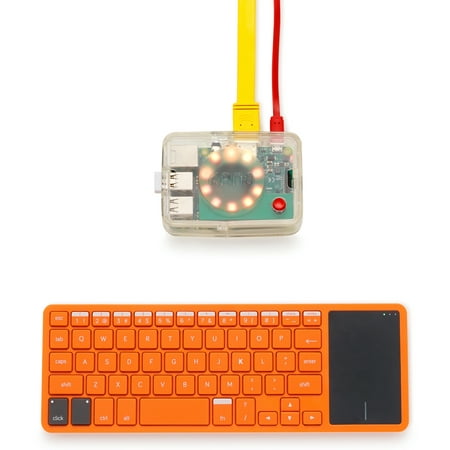
Kano Computer Kit Complete | Make a laptop. Learn to code

Hey guys,

I haven't played around with Kano OS for awhile. So, I had to update the system and try it out. There's not actually much change but, seem smooth enough. Even though, it's on a raspberry pi 3 b version.

Raspberry pi 3 B + are out now,  and I'm eager to test it out, installing Kano OS on it. I'm sure, it'll be blazing. Though, I'm wondering, if there's gonna be any new product update for Kano computer kit. I'll love to get the latest version!

Kano computer kit, are great for children to learn about computers and programming. It's pre-installed with lots of learning apps. Get it for the kids or even if you're interested in just dabbling around with it.

Get it via the link below:


Kano Computer Kit Complete | Make a laptop. Learn to code

The above is the complete kit. But, you can also get just the kit without the 10 inch screen monitor.


Kano Computer Kit – Make a computer, learn to code (10 pieces)


Storage Carrying Case for Kano Computer Kit Coding Toy fits Motion Sensor/Pixel Kit by Aenllosi (Black)

Get other Kano sensor and pixel kit!


Kano Motion Sensor Kit – Learn to code with movement


Kano Pixel Kit – Learn to code with light

Get the kids interested in computers and programming. Get 'em started with their own project!

Learning about electronics have never been so much fun!

Subscribe to our blog and youtube channel for latest post and upload!

Happy computing!

P.S. Kano Computer Kit – Make a computer, learn to code (10 pieces)


Wednesday, February 14, 2018

Storage Carrying Case for Kano Computer Kit


Storage Carrying Case for Kano Computer Kit Coding Toy fits Motion Sensor/Pixel Kit by Aenllosi (Red)

Hey guys,

Check out this cool storage carrying case for kano computer kit!

It's great for your kids or even you to bring this along anywhere and use it anytime you want. If you have a tv with hdmi or a monitor, just plug it in and you're ready to go!


Check out the Kano screen kit below:


Kano Build Your Own Computer Screen Kit


Kano Computer Kit 2017 – Make a computer, learn to code

Kano computer are still my favorite learning computer and even for programming. I discovered Scratch coding via their training module. You'll learn about python and learn to code games like minecraft hack, terminal quest, pong or even snake!

Get your kids to learning programming with Kano!

A fun way to learn!

Get it now!

Happy computing!

P.S. Storage Carrying Case for Kano Computer Kit Coding Toy fits Motion Sensor/Pixel Kit by Aenllosi (Red)


Sunday, November 19, 2017

Terminal MPS-Youtube for Raspberry Pi 3


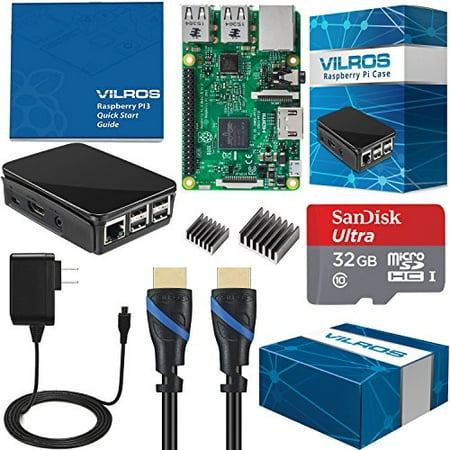
Click here to get Vilros Pi 3 Start kit Bundle! icon

Hey guys,

Check it out!

Here's a cool and alternative way to watch videos or just listen to music found on youtube!

Raspberry pi 3 are a great single board mini computer that you can use for multimedia entertainment or for learning computing. Installed with Raspbian, you can use it to learn programming and coding. Some even use it to play retro games!

The problem with raspberry pi 3 is that, the processor and gpu isn't good enough to open up a chrome browser to watch youtube videos. You can tweak here and there but it'll still lag. I'm hoping they'll come up with better processor and gpu to at least past this test.

I made a mistake yesterday of signing in to my chrome browser account on my raspberry pi and it installed all my extensions and configurations I've had on my pc. Needless to say, I had to kill all the access process and finally just decided to pull out the plug!

Now, I've decided to use alternative terminal browser like linx to surf the net and mps-youtube to watch videos or listen to my favorite music on youtube. It's really a lifesaver. This is partly why I like to play around using linux and especially on the raspberry pi.

You learn to work around it's limitations. Try out new things and definitely learn a few things along the way too. Anyway, mps-youtube have been around for a long while and if you haven't try it out than you can go to the website to learn how to install it.

Watch my video to see what it can do!

icon icon

Click here to get Vilros Pi 3 Start kit Bundle! icon

Get your raspberry pi 3!

Did you know that there are still people who haven't heard of raspberry pi or even linux?

Ubuntu, been out for like years and most people are oblivious to it. That's why I like the fact that the raspberry pi 3 are cheap and small enough for people to get into. It's a great way to let children start learning about computing. If only, they were available back during my school days!


Kano Computer Kit 2017 â Make a computer, learn to code

Kano computing are one such company that's reaching out to the children!

Check them out!

Enjoy and happy computing!

P.S. Click here to get Vilros Pi 3 Start kit Bundle! icon

Wal-Mart.com USA, LLC

Friday, October 27, 2017

DIY Raspberry Pi 3 7" Touchscreen Lcd Display Tablet with Kano OS


Raspberry Pi 3 7-Inch Touchscreen Display

Hey guys,

Check it out!

I really love Raspberry pi 3!

Raspberry Pi 3 Board and 16GB, 10class, with NOOBS

I have one installed with Recalbox and now, I have a DIY retro gaming machine with loads of my favorite games. There are some old games that I have played before but some, I've never even heard of. So, it's kind of cool.

I didn't want to keep swapping my microSD card on one raspberry pi, between playing games and using Kano OS. That's why, I've decided to get another Raspberry pi 3. Since, I'll need a monitor and also want it to be portable, I end up getting the 7" touchscreen with a case that can also house the pi 3.


Raspberry Pi 3 7-Inch Touchscreen Display

I had watched some tutorial videos on youtube and it was pretty easy to set up. You just need to connect the ribbon and the wires from the touchscreen adapter to the raspberry pi. The touchscreen that I've bought already did some attachment for me. That makes it more easier for me to assemble the parts.

Once, I've finished linking all the cables, I inserted my micro SD card that I've already formated and installed with Kano OS using etcher. Let it bootup and voila!

I like Kano OS although, it's geared towards children for learning programming and coding. If only they had these when I was a kid. But, technology have definitely improved and that's why it's important for children today to take advantage of them and learn.


Kano Computer Kit 2017 â Make a computer, learn to code


Kano Screen Kit

Who knows, we'll be able to travel the stars in the near future sooner rather than later. But, I'm looking too far ahead.

By the way, take note that Kano OS are for the desktop monitor or tv version. So, the image will looked a little smudged on the small 7" screen if you installed the Kano UI. But, if you use it using the 'classic mode', it'll be a little better.

If you prefer, you can get the Kano computer and also the 10" Screen kit. And, you won't have that screen smudge problem!

I haven't really played around with my raspberry pi 3 tablet yet, but if you're watching youtube or visiting websites, it's a little slow to load. But, it plays the video fine without any kind of lag. I've played some music off my usb drive and there's no problem there too.

I might get myself a portable charger  and some other accessories, so that I can really make my raspberry pi tablet portable. For now, I'm just happy that I finally got my own DIY raspberry pi 3 tablet with Kano OS installed!

Get yours if you're interested to make your own DIY raspberry pi 3 tablet!

Definitely, great fun diy project!

Happy computing!

P.S. Kano Computer Kit 2017 â Make a computer, learn to code

Wal-Mart.com USA, LLC