Thursday, November 05, 2020

Laptop Cooling Pad unboxing - Cooler Master


Cooler Master NotePal X3 - Laptop Cooling Pad with 200mm Blue LED Fan

Hey guys

Check it out!

I bought a laptop cooling pad by Cooler Master around 5 years ago. I bought it for my Alienware M14x. Haven't been using it for a while after I sold it. Since I bought a new laptop, I thought I'll use it. For gaming on a laptop, it does get really hot and it causes lag.

A cooling pad really does help if you game for long hours. It will help with ventilation. Unless you have aircon in your room or your house. Keeping your laptop and computer cool will help the system in the long run.


Cooler Master NotePal X3 - Laptop Cooling Pad with 200mm Blue LED Fan

Nowadays, there are many powerful cooling pads with nice cool design. Some of them even come with USB ports, fan speed control, and an indicator panel. I like those that come with led lights. Okay, I like anything that comes with LED lightings.

I saw one yesterday that's a laptop dock with all the various ports and also includes a cooling pad. Would be cool to be able to charge your other electronic devices while using your laptop. Also, you'll even be able to extend to a bigger monitor to work on or entertainment.


ICE COOREL RGB Laptop Cooling Pad for 15.6-17.3 Inch, Gaming Laptop Cooler with 6 Quiet Cooling Fans and 6 Stand Height Adjustable, LCD Screen and Rainbow Lights, Two USB Ports and One Phone Stand

If your main computer at home is a laptop, you'll probably need a powerful laptop dock. Most people are using laptops rather than a bulky desktop computer. Especially, if you travel a lot for work. You don't have to transfer your work to your main pc

Check out the one below by Asus:


ASUS USB3.0_HZ-3B Docking Universal Laptop Docking Station, Black

  • Single-cable connection for conveniently expanding your laptop's connectivity options 
  • Four USB 3.0 ports with fast-charge support for quickly charging your portable devices 
  • USB 3.1 Gen 1 Type-C (USB-C) port for greater any-way-up connectivity options for accessories like external hard drives, smartphones, or cameras 
  • Dual-display support: HDMI port supports 4K UHD (3840 x 2160) external displays, and DVI-I port supports resolutions up to (2048 x 1152) 
  • Gigabit Ethernet port. The adjustable stand props up the laptop for better viewing angles and improved airflow
It doesn't come with a cooling pad though. Love the bar design and all the ports available. Just like a normal desktop. Well, you can always buy a cooling pad that goes with the laptop docking station. Check out some of them below:


TECKNET Laptop Cooling Pad, Portable Ultra-Slim Quiet Laptop Notebook Cooler Cooling Pad Stand with 2 USB Powered Fans, Fits 12-16 Inches


KLIM Ultimate + RGB Laptop Cooling Pad with LED Rim + Gaming Laptop Cooler + USB Powered Fan + Very Stable and Silent Laptop Stand + Compatible up to 17" + for PC Mac PS4 Xbox One + New 2020


Laptop Cooling Pad, Laptop Cooler for 14-17 Inch Gaming Laptop, Gaming Laptop Cooler Double Blower Cooler Pad with Dust Filter, Flexible Rubber Ring, Colorful Lights, Adjustable Mount Stand, Third Gear Speed-Black


IPOW 12-Mode RGB Laptop Cooling Pad LED Screen Gaming Laptop Cooler with 6 High-Speed Adjustable Fans, 7 Heights Stand, 2 USB Ports, Compatible up to 17'' Laptop & PS4

Now, if they also come for the laptop holder or wall mount. Especially, if you link up your laptop to an external monitor. I actually like the slim, light-weight type as you can also bring it along with you. You'll be able to keep your laptop well ventilated even when you're not gaming.

What you guys think?

Buy me Coffee if you like our blog and youtube channel @

https://www.buymeacoffee.com/W04oadL

*Shop the latest deals on Amazon via our links to support us. Tq!

Subscribe to our blog and youtube channel for the latest post and video upload!

Happy computing!


P.S. TECKNET Laptop Cooling Pad, Portable Ultra-Slim Quiet Laptop Notebook Cooler Cooling Pad Stand with 2 USB Powered Fans, Fits 12-16 Inches


Wednesday, November 04, 2020

Space Bar Monitor Stand unboxing with setup


Monitor Stand with Hub, Klearlook Foldable Monitor Riser with USB Ports and Type-C Port 24 W Fast-Charging Width Adjustable Desk Organize Non-Slip Feet Compatible with iMac/Surface Studio/Dell XPS 27

Hey guys,

Check it out!

I don't remember if I have posted about my Space Bar Monitor Stand before. But, I thought I'll talk about it after getting the 15.6" portable monitor. I'm still using it. I've had it for almost 2 1/2 years and it's still working great for me.

I'm glad I bought it because it also has four USB ports. I found it useful not just for charging my electronic devices but also, more importantly, it helps powered my portable monitor. A portable monitor wasn't even a thing back in 2017?


Monitor Stand with Hub, Klearlook Foldable Monitor Riser with USB Ports and Type-C Port 24 W Fast-Charging Width Adjustable Desk Organize Non-Slip Feet Compatible with iMac/Surface Studio/Dell XPS 27

When I bought the monitor stand, I didn't know it will, later on, help power, my portable monitor, too. A portable monitor doesn't need much power. It only needs 5V. So I don't need extra power points like a normal pc monitor.  

Now, it easily helps power both my portable monitor, and I still have 2 extra USB ports to spare. There are still too many cables though. But, with a little cable management, it won't make your table looks too messy. Although, I'll prefer the USB port positioned to the side.


Vaydeer USB 3.0 Aluminum Monitor Stand Metal Riser Support Transfer Data, Keyboard and Mouse Storage Desk Organizer up to 27inch for Laptop, Computer, Notebook, MacBook, PC (Black)

Initially, I did have a problem with my monitor stand. It's too low. My Razer Chroma mechanical gaming keyboard can't be slid under it. So, I got the idea of lifting it up by putting a small 2x4 wood to raise it up by an inch.  

Lucky for me, I bought the 87 keys type. So, my mouse can also be slide beside the keyboard. It all works out in the end. The problem is now, it's not wide enough. It won't fit both my 15.6" and 13" portable monitor. It's not really a problem, but I'm thinking of getting a new monitor stand.


MONITORMATE ProBASE X USB3.0 Aluminum Monitor Stand with 18W Fast-Charging Port(Compatible with iPhone Xr/Xs/11/11 Pro/12/12 Pro), Ethernet Port, USB3.0 Hub, SD/MicroSD Card Reader (Silver)

I need or rather want a monitor stand with USB ports, high and wide enough to slide my Razer keyboard below it, including my mouse. Would be nice if they include a stand for your mobile phone, iPad, or laptop. 

I'm still looking around for the 'perfect' monitor stand. If you have read my past posts, the design is pretty important to me. It also has to be practical. Yeah, I know, it's just a monitor stand. But, hey if you're paying for something, you'll want the best and the coolest that you can afford right?


Aluminum Desk Monitor Stand Riser with 4 USB Hub for Speaker TV PC Laptop Computer Screen Riser Desk Organizer (Aluminum)

There is some cool design available but they're either too high or too low. And, also not long enough. I tried looking for a dual monitor stand but most of the time, there are no USB ports included. Guess, I just have to keep looking.

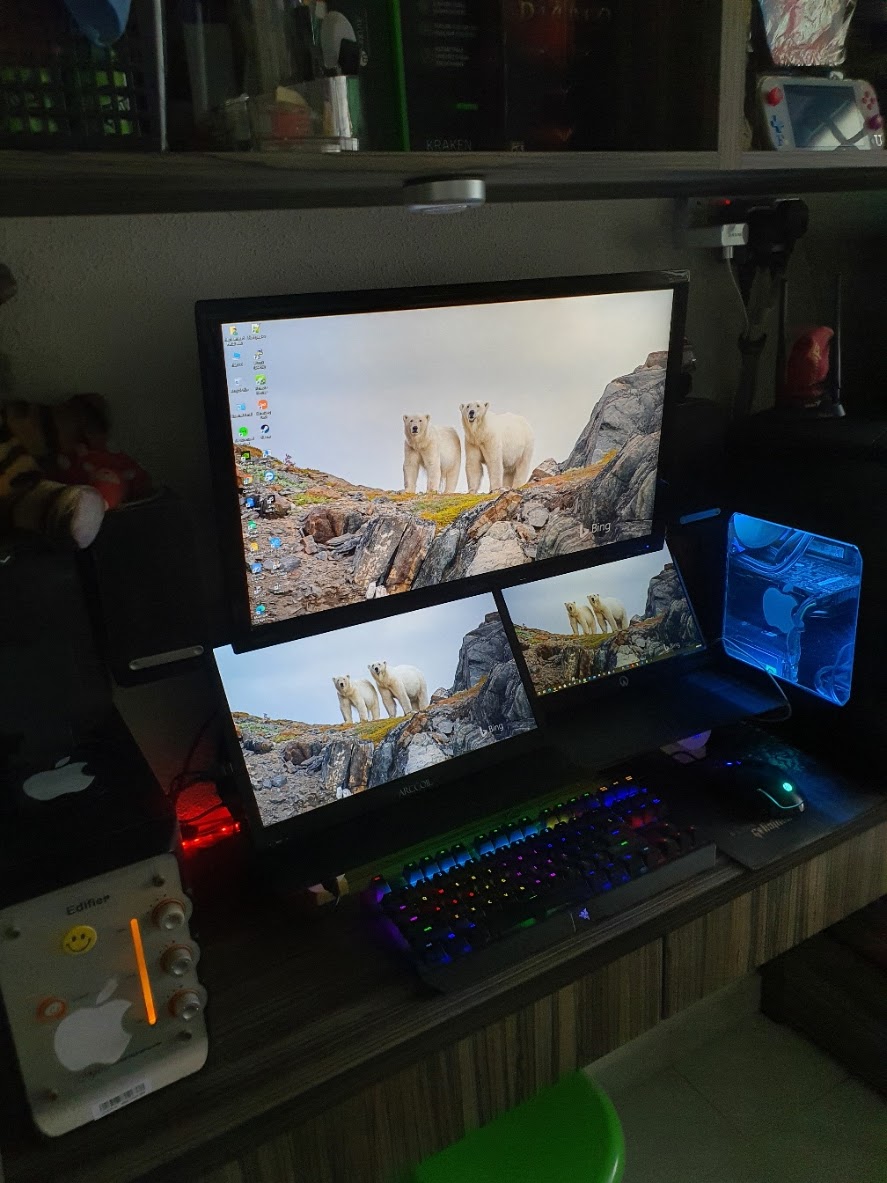
In the meantime, I'm pretty happy with my current 1 monitor and 2 portable monitor setup. I'm really enjoying having 3 monitors to multi-task. I showed a picture to my nephew and he jokes, it looks like the CCTV set up in the security room. lol.


For me, a portable monitor is way better than a normal PC monitor. They're light, slim, and obviously portable. You can set them any way you wish. If I need to, I can also bring it along together with me when I'm traveling. Pretty nifty!

What you guys think?

Buy me Coffee if you like my blog and youtube channel @

https://www.buymeacoffee.com/W04oadL

*Shop the latest deal from Amazon via our links to support us. Tq!

Subscribe to our blog and youtube channel for the latest post and video upload!

Happy multi-tasking!


P.S. Vaydeer USB 3.0 Aluminum Monitor Stand Metal Riser Support Transfer Data, Keyboard and Mouse Storage Desk Organizer up to 27inch for Laptop, Computer, Notebook, MacBook, PC (Black)


Tuesday, November 03, 2020

ARCCOIL 15.6 Inch Portable 1080P Flat Panel Display Monitor unboxing


Lasitu Ultrathin&Ultralight Portable Monitor 15.6 Inch Full HD 1080P USB C Monitor with Type-C/HDMI Portable Screen for Laptop Mac PC Phone Xbox PS4 Switch, Smart Case & Screen Protector Included

Hey guys,

Check it out!

My new 15.6" Portable Monitor just arrived today, and I did an unboxing video of it. You can watch it above or here on my youtube channel. I must say, it took me a while to set it all up. My mistake for assuming that I have an extra HDMI port.

I thought I had an extra HDMI port for my new monitor. I was thinking, I might have to get an HDMI splitter. But, I forget I still have a VGA port. It didn't work at first, but I kept trying, and out of the blue, the VGA port works. Once, I confirmed that all the monitor display works, I did my cable management.


Lasitu Ultrathin&Ultralight Portable Monitor 15.6 Inch Full HD 1080P USB C Monitor with Type-C/HDMI Portable Screen for Laptop Mac PC Phone Xbox PS4 Switch, Smart Case & Screen Protector Included

I'm actually using my new monitor now. Since it's a 15.6-inch size, I put it on my left as my main pc monitor. My top 24 inches will be for watching youtube and movies while on my right is my other 13 inches smaller monitor. 

I'm glad, I hanged my 2 speakers, as it creates more space for both the portable monitor. I must say, I love having more monitors to multi-task. I can watch my favorite youtube content while checking out social media and Whatsapp all at the same time.


This is my 'old' setup with two monitors.


My new ARCCOIL brand 15.6" portable monitor. 1080P IPS and HDR. Pretty light and slim compared to my 13" 'older' portable monitor.


It works right out of the box. Plug-in my USB A to C for power. HDMI to HDMI Mini to connect to my main pc. Of course, it can also work with other devices like your game console or even your mobile phone for mobile computing.


I couldn't make all the display work at first. I didn't check if I had enough HDMI port for 3 monitors. Like, I say, sometimes I'm just too lazy to confirmed everything first before buying.


Well, I forgot, I can still use my VGA port to connect to my main monitor. Didn't work at first, but I kept retrying and it all finally works. Now, that's what I call experience. For some reason, they don't always work the first time around. If you keep trying it'll work eventually.

I think, my VGA port can't play videos at 1080P. Can they? No, I don't know that. (*Update)Ok, I just discovered I can watch in 1080P videos. That's why I might get myself an HDMI splitter. There are some pretty cheap one. I took a quick look but I'm trying this out first before making my decision. 


Portable Monitor - Lepow 15.6 Inch Full HD 1080P USB Type-C Computer Display IPS Eye Care Screen with HDMI Type C Speakers for Laptop PC PS4 Xbox Phone Included Smart Cover & Screen Protector Black


Portable Monitor - Lepow Upgraded 15.6 Inch 1920 x 1080 Full HD USB Type-C Computer Display Ultra-Slim IPS Screen with HDMI Type-C Port Dual Speaker Game Monitor for PC MAC Laptop PS4 Xbox Cellphone


Sabrent USB Type-C Dual HDMI Adapter [Supports Up to Two 4K 30Hz Monitors, Compatible with Windows Systems Only] (DA-UCDH)


j5create USB to HDMI Adapter - Dual HDMI USB 3.0 Multi-Monitor Cable | 4K Ultra HD | Compatible with Microsoft 7, 8.1, 10 / Mac OS X v10.6 and Above


SIIG 3 Port DisplayPort to HDMI MST Hub 4K UHD - 1x3 DP to HDMI Muti Monitor Splitter - Multi-Stream Transport (MST) Technology - Ultra HD up to 3840x2160 @ 30Hz (4K) - Mirror, Extended, Video Wall

Note that you need to check to make sure that you get the correct HDMI splitter. Some are only for mirroring. While some use a USB C connector.  I myself just discovered that there's a special port for multiple monitors. Yeah, I didn't know that too. Was wondering why the port was different.

I only discovered all this info because it's only now that I thought of using multiple monitors for multi-tasking. Also, back in the day, we only use VGA to connect to monitors. HDMI doesn't even exist back then. Lol. I sound old and outdated.

Anyway, I'm just happy, I got what I wanted and set out to do. Oh, if you're wondering, I think a portable monitor uses less power (5V) than a normal monitor. A portable monitor doesn't need much power. I'm plugging their power into my monitor stand which has 4 USB ports.

Pretty nifty, aye?

What you guys think?

Buy me Coffee if you like our blog and youtube channel @


*Shop the latest deals from Amazon via our links to support us. Tq!

Subscribe to our blog and youtube channel for the latest post and video upload!

Happy multi-tasking!


P.S. Sabrent USB Type-C Dual HDMI Adapter [Supports Up to Two 4K 30Hz Monitors, Compatible with Windows Systems Only] (DA-UCDH)